
Known Participant
May 25, 2023
Question

The display of content has been changed to style when hide conditional tag (blue)

  • May 25, 2023
  • 1 reply
  • 665 views

Hello everyone,


I have a problem about Show/hide conditional text in Framemaker 2019.

I hide the blue content applied hide tag.

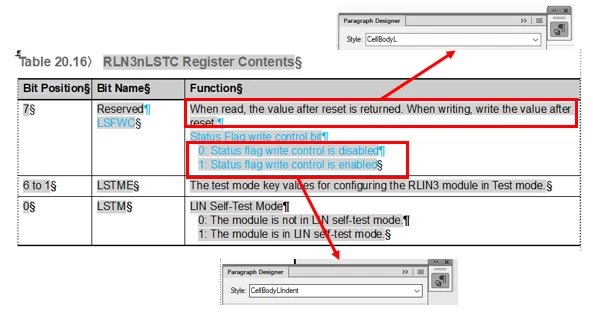
Before

Content [When read, the value after reset....] assigned style CellbodyL (left alignment)
After

The content has been changed to style CellbodyLIndent (Indented)
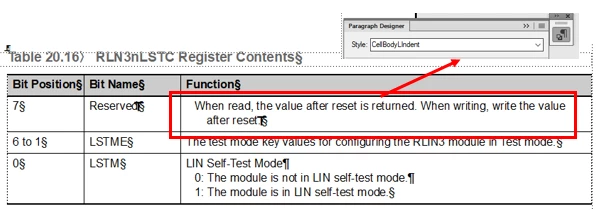
 

How to not change the style of the content when show/hide conditional text in document.

Thank so much!

This topic has been closed for replies.

1 reply

Bob_Niland
Community Expert
Community Expert
May 25, 2023

The Condition appears to be applied to the ¶ of the lead paragraph, but not to the § of the final one. When the Condition is turned off, the lead para is likely inheriting the format of the hidden paras. Fix: clear, re-select and re-apply the condition to just the final paras.

Known Participant
May 25, 2023

Hi Bob,


Thanks for your reply

I fixed it as you suggested (clear, re-select and re-apply the condition to just the final paras)

But, When I show/hide conditional text, it appears blank line


I wish that blank lines would not appear in the ouput when hide conditional text


Jeff_Coatsworth
Community Expert
Community Expert
May 25, 2023

I notice that in your first Before shot, you've applied the conditional tag to the first line's paragraph text symbol too - in your second "before" shot, you haven't.