
Known Participant
May 22, 2024
Answered

The empty pages keep returning issue revisited

  • May 22, 2024
  • 2 replies
  • 481 views

My heading refers to Solved: Empty pages keep returning FM 2017 - Adobe Community - 9987986


FM changes the pagination properties for two out of 16 files in the book and adds empty pages. I have changed the setting manually, but FM changes it back each time I update the book.

I want all chapters to start on the next empty page.


My setting:
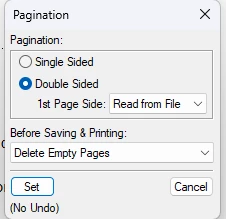


FM's setting after book update:
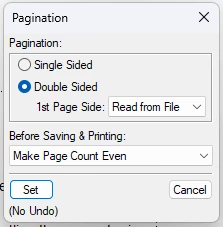


I apply the desired setting with all files in the book selected before updating it.


I have followed Adobe FrameMaker: Deleting Empty Pages – Rocky Mountain Training but the problem persists.


The "next available"-setting does not solve the problem.

    This topic has been closed for replies.
    Correct answer Winfried Reng

    Did you change this in the book window? Otherwise FrameMaker will ignore your setting.

    What's the setting of the following file? If it is set to start on an even/uneven page (e.g. via Read from File), then FrameMaker might add an empty page at the end.

    Additionally: Do you have any settings in your paragraph formats that the paragraph is on an even/uneven page?

    2 replies

    frameexpert
    Community Expert
    Community Expert
    May 22, 2024

    See my short video series on FrameMaker pagination:

    https://youtu.be/AiI1DOoA6Ug?si=GdduanMQOoQFlZzw

    Community Expert
    May 22, 2024

    Hi Peter,

    When you want that each file starts on the next available page, you have to set this in the Pagination of the single files in the book. Not Read from File.

    You can also select several files and then right-click and change this setting.

    Then update the book.

    When you set Read from File, FrameMaker will take the right/left setting of the first page of a file and keep this. And this might not be the next available page.

    Best regards, Winfried

    Known Participant
    May 22, 2024

    Hi Winfried,

    I chose this setting for one of the files in question:

    I updated the book but FM changed the setting back to this and added an empty page: 


    Best regards, Peter

    Winfried RengCommunity ExpertCorrect answer
    Community Expert
    May 22, 2024

    Did you change this in the book window? Otherwise FrameMaker will ignore your setting.

    What's the setting of the following file? If it is set to start on an even/uneven page (e.g. via Read from File), then FrameMaker might add an empty page at the end.

    Additionally: Do you have any settings in your paragraph formats that the paragraph is on an even/uneven page?