Known Participant
July 28, 2023
Answered

The line goes to next page with image in Adobe Frame Maker

  • July 28, 2023
  • 3 replies
  • 444 views

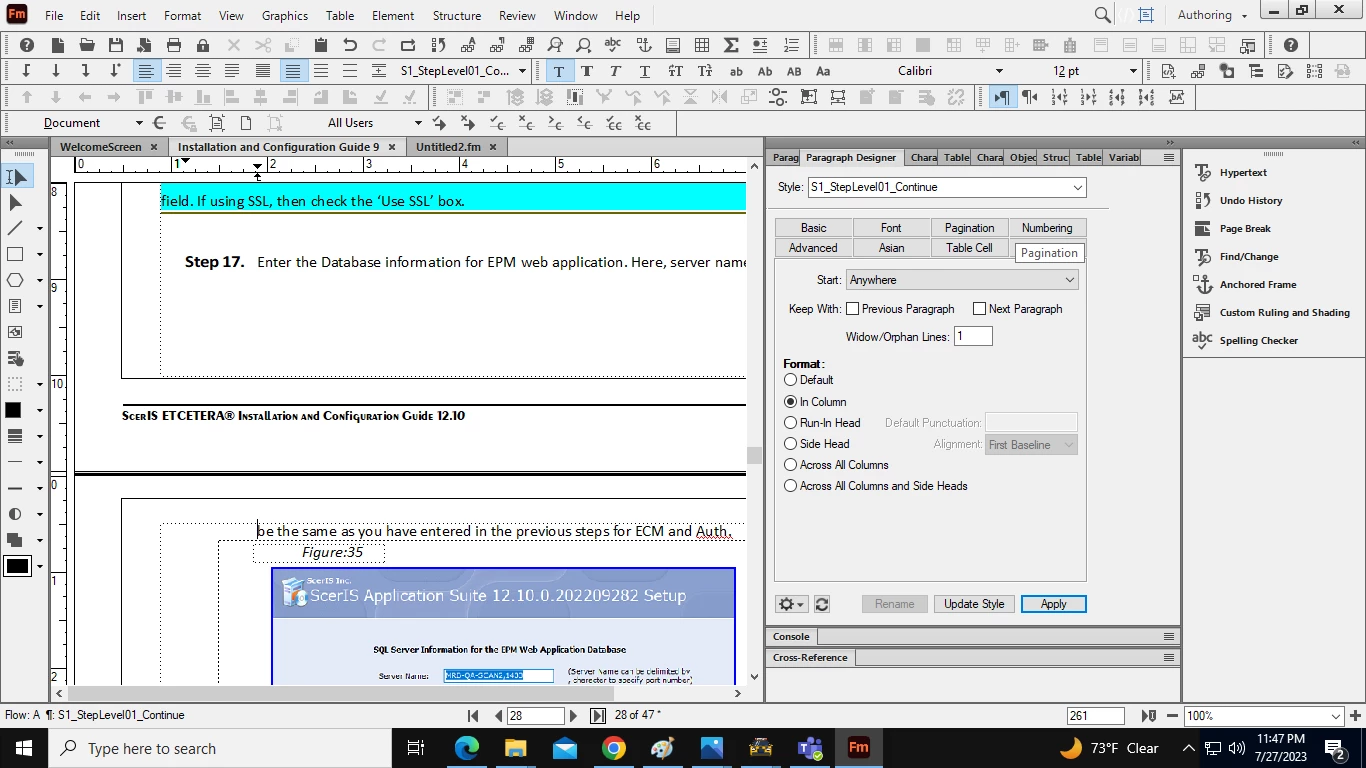
The text line goes to next page with image in Adobe Frame Maker, how to fix?
 

    This topic has been closed for replies.
    Correct answer Winfried Reng

    Hi Amit,

    The line on the next page is from step 17. In your screenshot you see that in the Paragraph designer the Widow/Orphan Lines are 1. That means that a single line of a paragraph can move to the next page or column.

    When you set this value to 2, then minimum 2 lines will move. Or the whole paragraph, if the paragraph has only 3 lines.

    Best regards, Winfried

    3 replies

    Dave Creamer of IDEAS
    Community Expert
    Community Expert
    July 29, 2023

    Where is the graphic following the text anchored? If it's at the end of the text, put the anchor on its own paragraph (make a small anchor style, such as 2 pt.). Depending how what graphic the text belongs to, you can use the keep with previous/next settings to make sure the text and graphic don't separate.


    And as @Winfried Reng mentioned, change your widow/orphan settings for the caption. 


    David Creamer: Community Expert (ACI and ACE 1995-2023)
    Known Participant
    July 30, 2023

    thank you!

    Barb Binder
    Community Expert
    Community Expert
    July 28, 2023

    Hi Amit:


    The text line goes to next page with image in Adobe Frame Maker, how to fix?

    If you want both lines together, follow Winfried's instructions and the entire step will move to the top of page 28.


    If you want both lines of the step on page 27 and the image on the top of page 28, select the frame and enable Floating in the Anchored Frame panel. 


    By the way, it is always best for us if you enable Text Symbols before posting screen shots. 


    ~Barb

    ~Barb at Rocky Mountain Training
    Known Participant
    July 30, 2023

    Thank u Barb, i'll enable text symbol on from now on.

    Winfried RengCommunity ExpertCorrect answer
    Community Expert
    July 28, 2023

    Hi Amit,

    The line on the next page is from step 17. In your screenshot you see that in the Paragraph designer the Widow/Orphan Lines are 1. That means that a single line of a paragraph can move to the next page or column.

    When you set this value to 2, then minimum 2 lines will move. Or the whole paragraph, if the paragraph has only 3 lines.

    Best regards, Winfried

    Known Participant
    July 30, 2023

    Thank you Winfried! This worked!