
Participant
February 23, 2017
Question

The TOC isn't getting auto-updated

  • February 23, 2017
  • 2 replies
  • 253 views

The TOC which I have now with me does not have any leader lines and while I tried to change the way it looks, by going to the reference pages and adding new tab stops with left, right with leader lines.

Now when I go to the body pages I don't see the update happening automatically, instead I had to enter the "Tab" before each page number in TOC.

Tried by updating the whole book, but still it doesn't fetch me the desired result.

Please help me with:

where am I going wrong

the probable solution

Screen Shot of the current TOC:
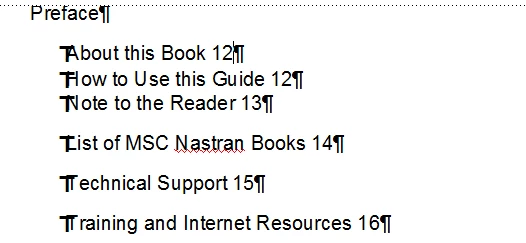
Screen shot after editing the reference page and pressing the Tab key on the body pages accordingly:

I am using FM unstructured.

Regards,

Manohar.

    This topic has been closed for replies.

    2 replies

    Participant
    March 2, 2017

    Hi,

    I haven't added the leader dots earlier and now the output is exactly what I was trying for. Thanks for replying.

    Barb Binder
    Community Expert
    Community Expert
    February 23, 2017

    Will you show us your TOC reference page with Text Symbols visible?

    The tabs should be added there, and you should see the leader dots on the reference page, for example:

    <$paratext>..............................<$pagenum>

    Once the reference page is set up correctly, then you can update your book and Fm will add the tabs on the body pages for you, and apply the formatting (leader dots) as well.

    ~Barb at Rocky Mountain Training