
Known Participant
January 28, 2020
Question

TOC_alignment

  • January 28, 2020
  • 3 replies
  • 1193 views

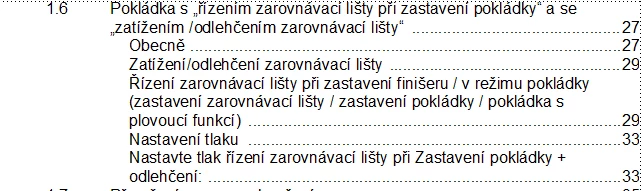
If the heading is too long,How can i wrap text automatically in toc??see the below image. i used another key Esc space h some time its working but not giving proper alignment. for example see the 29 it has three lines, all the three lines in proper alignment. some time the 2nd or 3rd lines are not in same alignment while using Esc space h or control space. so i need another way to solve it. if anyone knows solution tell me your support would be appriciated!!! 

Note : I am using unstructure doc
This topic has been closed for replies.

3 replies

LinSims
Community Expert
Community Expert
January 30, 2020

Do us a favor and turn on the text symbols (View > Text Symbols) then take two more screen shots, one of the ToC with the issue and another of the TOC reference page.

Known Participant
January 31, 2020

This is my reference page:


See the 2 & 3rd image some sub level headings are bold, and page num is not in proper alignment. 

i need toc like above image. this image also taken from same toc but some of the chapter headings coming properly some of them not. all sub headings in one style and sub sub level headings in one style.  chapter headings style is also same only that different is numbering  for example : A\t,  B\t,  C\t .For level 1 heading only bold fonts given that you can see in reference page  ( 1st image)

barbara_a7746676
Community Expert
Community Expert
January 31, 2020

The TOC entry in your screen capture, the one that does not have the number aligned correctly, is indented. The indent may be throwing off the tab stops. 

barbara_a7746676
Community Expert
Community Expert
January 29, 2020

In the paragraph designer, select the paragraph tag for your TOC paragraphs. In the Advanced tab, under Word Spacing, set the Minimum to 275%, the Maximum to 325%, and the Optimum to 100%. Then click Update All. Do this for each TOC paragraph (that is, each level) that may be more than one line long.

These percentages should give you a good result. At the very least they should be close to what you need and can be tweaked if necessary.

Known Participant
January 29, 2020

Hi, 

I tried with this method but its not working for me. i need all the heading shuold be ending with same alignment for example:1

1      xxxxxx.............1          

1.1   xxxxxxxxxxx

        xxxx.................2

But what im getting is

Example:2

1    xxxxxxx.............1         

1.1 xxxxxxxxxxxx

      xxx2

I need,If the heading is too long then aslo it should automatically wrap and start with previous line with dotted line and page number like Example 1.

barbara_a7746676
Community Expert
Community Expert
January 29, 2020

Do you have a right aligned tab stop for the TOC paragraphs?

Check the reference pages to make sure that there is a right-aligned tab stop for all TOC tags between <$paratext> and <$pagenum>

Jeff_Coatsworth
Community Expert
Community Expert
January 28, 2020