

Oleg_Shynkarenko
Known Participant
May 16, 2021
Question

TOC and pagination view

  • May 16, 2021
  • 2 replies
  • 232 views

I created TOC and it was very ugly and primitive us usual, so I decided to import settings an other properties from a good TOC that I have on my hard-drive. The good TOC looks like that:
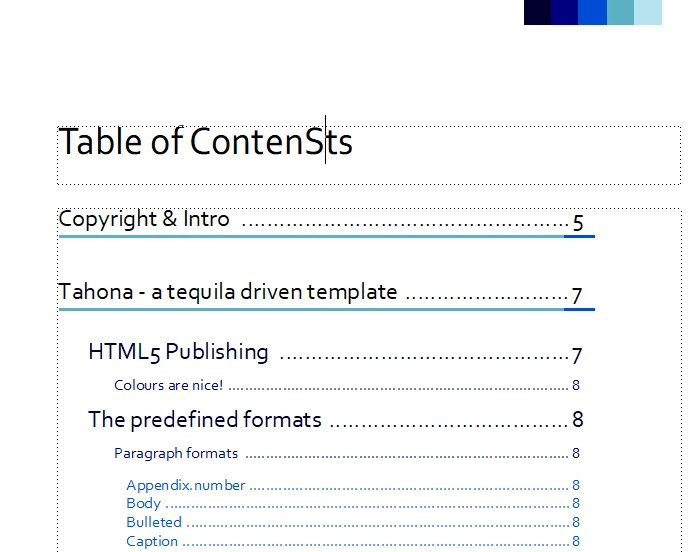
My TOC after the import, updating the Book and TOC and redefining the Paragraph catalog elemets looks like that. Sequential pagination is absent at all, the number of pages are not in line, there is not breadcrumbs lines. What is going on? What my TOC does not look like the imported one?

This topic has been closed for replies.

2 replies

Barb Binder
Community Expert
Community Expert
May 16, 2021

Hi @Oleg_Shynkarenko:


You will need the same style names in both projects for them to line up after using File > Import > Formats. And looking at the tightly-cropped screen shots, you will need to enable the checkboxes for Paragraph formats, Character Formats, Reference Pages and Color Definitions at a minimum.


Another approach to reuse the formatting from an existing TOC is outlined here:

https://www.rockymountaintraining.com/reusing-a-framemaker-toc-or-index/ 


~Barb 


~Barb at Rocky Mountain Training
QuintinSeegers
Legend
May 16, 2021

Hi Oleg,


Check the TOC Reference Page. I ran into this myself a couple of times because my document didn't have an updated TOC Reference Page. When you import settings from your good TOC, also import the Reference Pages. That should fix the problem.