bowen192
Inspiring
October 3, 2013
Answered

TOC in a table / table in a reference page

  • October 3, 2013
  • 2 replies
  • 1684 views

Hello ,

FM11.

Simple question; can you use a table on a reference page or to create a TOC?

All my efforts have so far failed.

I want to end up with this:

http://img23.imageshack.us/img23/5784/nyw0.png

Any ideas?

This topic has been closed for replies.
Correct answer FieryPantone

appearI think I might have worded this slightly wrong.

I just want the TOC to appear  like the example I showed.  I may have naively thought that you would do this on a reference page.

I'm slightly nervous typing this as people have put a bit of effort in replying to me on the assumption that I knew what I was talking about.


Nah, no call to be nervous! this is a highly civilised forum! which is why I'll stick my neck out with the following explanation  …

  1. the Reference page tells FM what bits of content you want it to pull in.

    If you right-click on the ToC entry in the book window, you'll see a comprehensible dialogue that just shows you which styles will be considered for inclusion.
    If you open the Reference page for the table of contents itself, you'll see definitions like this, one for each style you've selected:
    <$paratext> ................ <$pagenum>
    Apart from the mysterious Active ToC, each entry on the Reference page uses its own style; check bottom left

  2. the Body page for the ToC shows the results, and this is the best place to adjust the styles

I've now checked my early-morning speculations with experiment, and here's a screenshot of the result – not a table in sight!
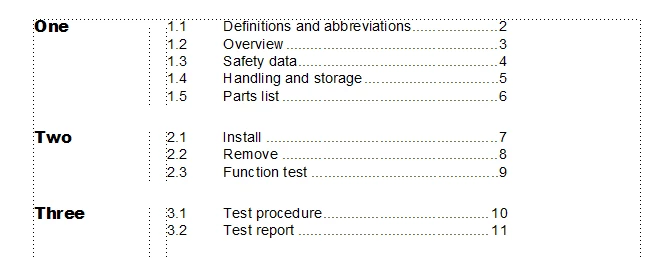
If you'd like me to send you the sample file off-line, let me know. Hope I haven't now explained more than you needed to know! but if this summary throws up questions about reference page building blocks or the delights of autonumbering, just ask.


2 replies

Participating Frequently
October 3, 2013

I'm not clear on why you'd want to use the reference page.

I think you can do this without a table.

Generate the TOC from the paragraph formats as usual

Include tabs and tab stops in the source paragraph formats.

Include a frame above the main heading paragraph format. The frame should contain a line that will appear above the paragraph.

Specify the numbering formats of the subheading paragraph format to not display the main number, by using a < > counter.

For details, search Google for terms like "FrameMaker frame above paragraph," "FrameMaker autonumber placeholder," and "FrameMaker paragraph overline," without quotes.

HTH

Regards,

Peter

_______________________

Peter Gold

KnowHow ProServices

Bob_Niland
Community Expert
Community Expert
October 3, 2013

Can FM auto-gen such a table? Doubtful.

Can you hand-create it using Xrefs? Maybe. Never tried it myself.

What's the failure mode?

bowen192
bowen192Author
Inspiring
October 3, 2013

Thought as much but thanks for confirming.

My example is actually pure x-refs.

It's pretty sturdy and the potential deletion of Chapter titles is close to none.

I'll leave it as it is.

Bob_Niland
Community Expert
Community Expert
October 3, 2013

> Can FM auto-gen such a table? Doubtful.

Having said that, I can think of a way.

Have FM generate a TOC file.

Import the Flow A of that file into your RP as a Text Inset.

Of course, to keep it current, it probably needs to be a TOC file in a BOOK, and if you don't ever want to render that TOC, it starts getting tricky.

All of which circles around why you need to do this.
