
Known Participant
November 26, 2018
Question

TOC not showing up in HTML and Index and Glossary showing up

  • November 26, 2018
  • 2 replies
  • 618 views

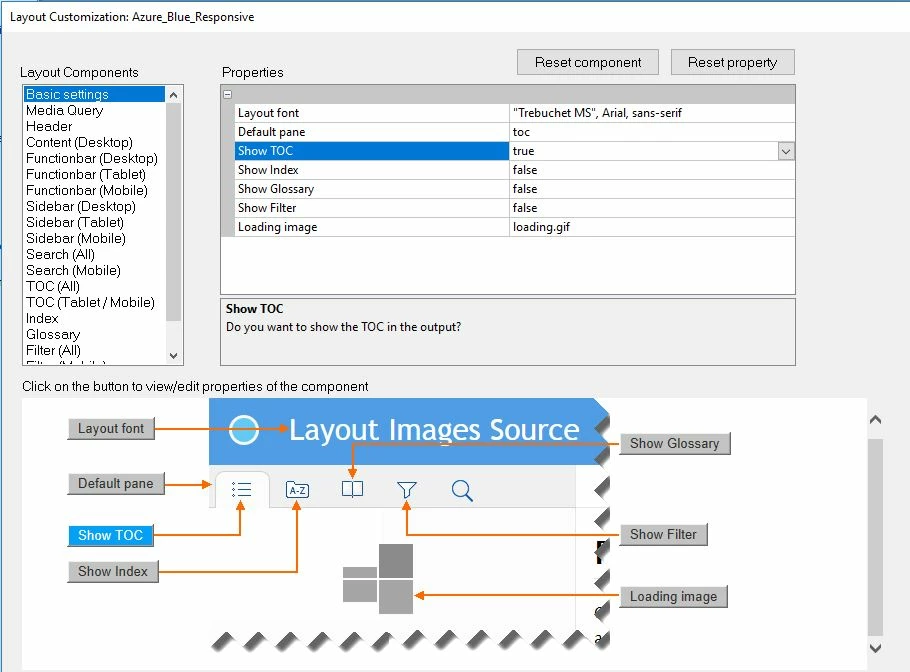
When I publish to Responsive HTML5 in unstructured FrameMaker Version 13.0.5.547 the TOC doesn't come through even though I have it marked as "true" in the settings.

I don't want the Index or Glossary to come through, so I have them set to "false" but the icons for them are still coming through into HTML.
This topic has been closed for replies.

2 replies

milliee62922081
Participating Frequently
August 4, 2024

I'm pretty sure that a recent Windows update has made my Responsive HTML output get all messed up. Perhaps yours has also fallen foul of something similar? Has this worked before?


Matt-Tech Comm Tools
Community Expert
Community Expert
August 15, 2024

What do you mean by all messed up?

-Matt SullivanFrameMaker Course Creator, Author, Trainer, Consultant
milliee62922081
Participating Frequently
August 15, 2024

Right after a Windows update my HTML output was showing a cross on some chapters rather than content and other pages that were shown in the TOC were not accessible by clicking on them. Numbering that previously worked started behaving differently too. Yesterday I found out about saving FM files as .MIF then back to FM and that seems to have sorted out most of the issues. I fixed the numbering by taking a different approach with it.

doug1120
Known Participant
November 28, 2018

Are you expecting the TOC to display on on page, like they do in a PDF?  If so, I don't think you can get that in HTML.  The TOC displays on the left in a a column, at least for me.  It never displays on the right.

Jeff_Coatsworth
Community Expert
Community Expert
November 28, 2018

Depends on the layout used and how much you want your web developers to mess around with them.