
Answered
TOC not updating page numbers FrameMaker 2017
- I am editing an existing user manual.
- I updating information on several pages which will throw off the actual pages versus the TOC
- I added two new header sections (Heading 3, not a chapter) that should show in the TOC
- I performed the steps to update the pages, chapters, and footnote for page numbers in the footer - all of that was successful.
However, when I save to PDF, the TOC is not updating.
- I manually add the (2) new headers where they should go by copying and pasting a similar. So they are there and formatted, but not linking.
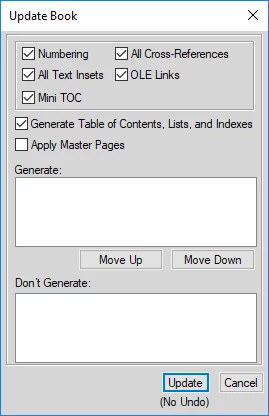
- I have tried several times to "Update the Book" with just the book open and not documents open, and the TOC does not update. The Update Book has nothing in the "Generate:" field. (see capture)
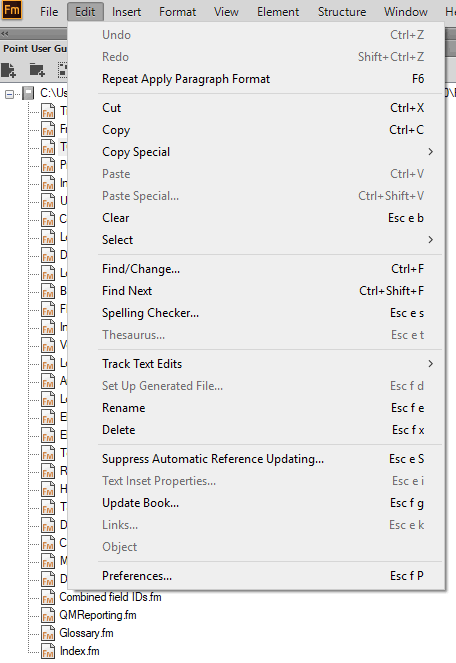
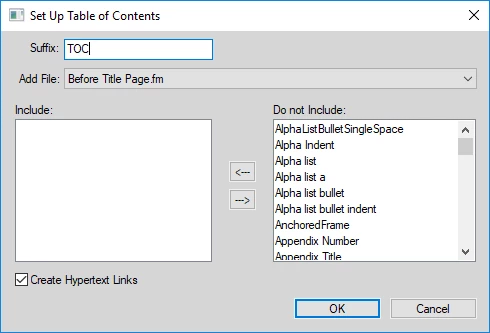
- The "Setup Table of Contents" does not display on the "Edit" menu. I see the following.
How do I update the TOC to reflect the new page numbers and the new headers? Thanks!


 AdChoices