
Inspiring
March 16, 2023
Answered

TOC numbering issue

  • March 16, 2023
  • 1 reply
  • 348 views

Hi,
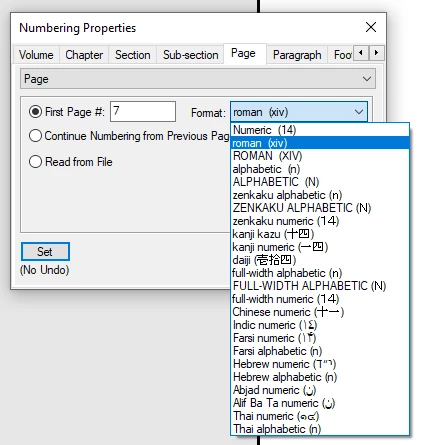
I am currently trying to modify a TOC for a book I'm working on. I have tried all the methods that are in the help locations, as well as the relevant messages in the community pages. Nothing is working. I am attaching a screen showing the issue with all the page numbers appearing in roman numerals.
Can someone please help me with this?


Thank you.


Elizabeth  
    This topic has been closed for replies.
    Correct answer FrameMaker-dk

    I think the issue is the page numbering properties in your book file.

    1. Right click the TOC in the book file
    2. Go to the Page tab
    3. Select the proper numbereing style


    4. Update the TOC again
    5. Cross your fingers 🙂

    1 reply

    FrameMaker-dkCommunity ExpertCorrect answer
    Community Expert
    March 16, 2023

    I think the issue is the page numbering properties in your book file.

    1. Right click the TOC in the book file
    2. Go to the Page tab
    3. Select the proper numbereing style


    4. Update the TOC again
    5. Cross your fingers 🙂
    Bjørn Smalbro - FrameMaker.dk