
Inspiring
December 4, 2018
Answered

TOC - page width issue

  • December 4, 2018
  • 6 replies
  • 3315 views

Hello all,

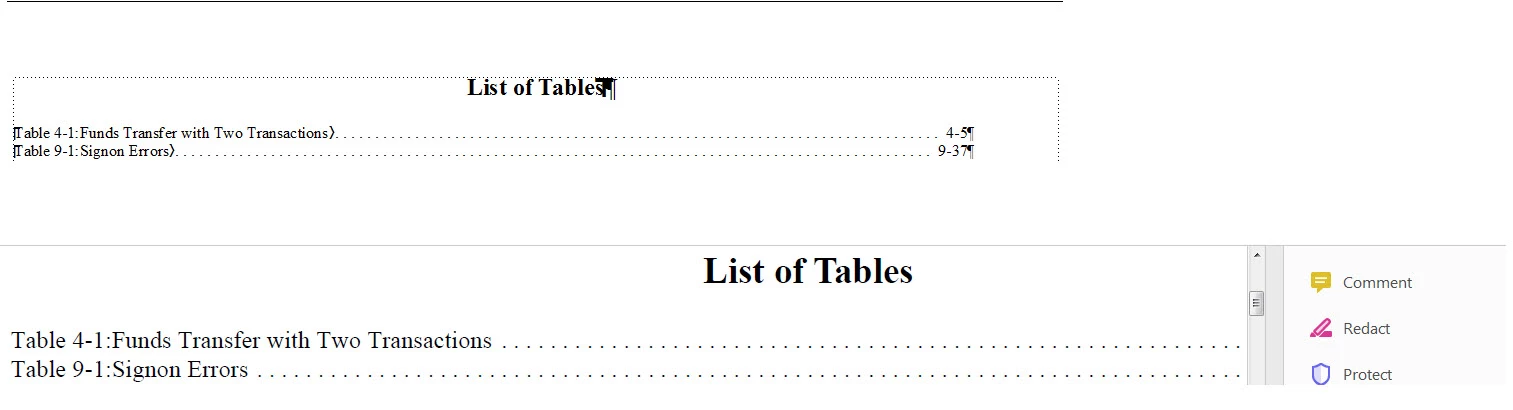
I've an issue where the TOC entries in a generated .pdf are being truncated.  So far, I've played around a bit with page layout and text frame size as well as tab stops but no luck.  Here is a composite showing a screenshot from FM and one from Adobe reader.  Note how the chapter/page is not showing in reader.
Thanks in advance.

regards,

Ben

    This topic has been closed for replies.
    Correct answer LinSims

    If the LOT is set up to be wider than the page width, and the tags used to format the entries are using that entire width, then that's why the page numbers aren't showing up. You've literally put them beyond the width of the page.

    Frame will wrap the long lines and you can set it up so that the second line indents a bit so it's obviously part of the previous line. If a two line entry in the LOT isn't acceptable, then change the font size so your longest line fits.

    6 replies

    LinSims
    Community Expert
    LinSimsCommunity ExpertCorrect answer
    Community Expert
    December 6, 2018

    If the LOT is set up to be wider than the page width, and the tags used to format the entries are using that entire width, then that's why the page numbers aren't showing up. You've literally put them beyond the width of the page.

    Frame will wrap the long lines and you can set it up so that the second line indents a bit so it's obviously part of the previous line. If a two line entry in the LOT isn't acceptable, then change the font size so your longest line fits.

    Inspiring
    December 6, 2018

    linsims

    Thanks for the reply.  But to be clear the LOT dimensions seen in my previous post along with the Page Size I set (Format>Page Layout>Page Size) to be W=700pt seems to have done the trick and I can see the CH-PG numbers on the right side of the entries.  The one thing I note however is that the right side of the frame

    Barb Binder
    Community Expert
    Community Expert
    December 6, 2018

    Hi Ben:

    700 pts is 9.7 inches. If you output to a PDF with a width of of 8.5 inches, the right side of the page will be truncated.

    Also did you finish that last sentence?

    ~Barb

    ~Barb at Rocky Mountain Training
    Inspiring
    December 5, 2018

    I seemed to have come to "a" solution.  Although, rather that using a screw driver on a screw, I may have used a hammer....

    I fumbled around with tab stops, page size and text frame size (on body and reference pages).  I would not at all be surprised if there is a better/cleaner way....

    B

    Barb Binder
    Community Expert
    Community Expert
    December 5, 2018

    So did the paper sizes match?

    ~Barb

    ~Barb at Rocky Mountain Training
    Inspiring
    December 6, 2018

    Hi Barb,

    I'm not entirely sure how to determine this but I tried to determine this by creating a .pdf (Save As .pdf from File Menu) for the LOT.

    The resulting .pdf file size is 26.9KB.  The FM file in 70.KB).

    Inspiring
    December 5, 2018

    Thanks for suggestions/advice.  Will proceed.

    In the meantime, I should mention that this is not a TOC but a LOT and it's the only page that I have issue with.  All other pages are generated fine into .pdf

    Barb Binder
    Community Expert
    Community Expert
    December 5, 2018

    Hi Ben:

    It doesn’t matter if it’s actually an LOT versus a TOC. All the generated files work the same way.

    ~Barb

    ~Barb at Rocky Mountain Training
    Inspiring
    December 5, 2018

    Hey Barb,

    Understood.  It's just that I've been cursed with the need to be anal....

    Barb Binder
    Community Expert
    Community Expert
    December 4, 2018

    It looks to me like it is a page size discrepancy, Ben.

    Check the Fm document size, and then check the resulting PDF document size. Are you on CC 2019 yet? How (exactly) are you creating the PDF?

    I'm guessing you are outputting to a smaller page size than your Fm file. As always, I'm happy to take a look if you want to put your TOC on dropbox and post a link.

    ~Barb

    ~Barb at Rocky Mountain Training
    doug1120
    Known Participant
    December 4, 2018

    What settings are you using for page size, margins, tab distances, etc?

    My first thought was that you might need to mark the Shrink To Fit checkbox, but unless your settings are wild you shouldn't need to.

    Inspiring
    December 4, 2018

    @doug1120

    Would you share a screenshot and perhaps some navigation to these attributes?

    thanks

    doug1120
    Known Participant
    December 4, 2018

    Sure.

    Click File > Save As PDF

    Set the filename

    Click Save

    On the PDF Setup for Selected Files dialog, the Page Size fields (on the Settings tab) control the page size.

    You can also try:

    Click File > Print Setup

    On the Print Setup dialog, click Properties

    On the Adobe PDF Document Properties dialog, you can experiment with the settings there. 

    You can also click the Edit button next to Default Settings on that tab.  The Standard - Adobe PDF Settings dialog should display.

    On the Standard - Adobe PDF Settings dialog you can experiment with any of the settings there, on any of the 6 tabs.

    NOTE:  I don't see the Shrink To Fit checkbox that I was expecting, so I was wrong about that.

    LinSims
    Community Expert
    Community Expert
    December 4, 2018

    This is probably a really stupid question, but what's your zoom level at in the PDF?

    Inspiring
    December 4, 2018

    Not so stupid, first thing I tried was to adjust. the zoom

    But alas, it mattered not....

    LinSims
    Community Expert
    Community Expert
    December 4, 2018

    Huh. So the leader dots go all the way to the right edge of the page?