
Toggle Conditional Text Between 2 Outputs - How to?
August 2022, Inherited an Adobe FM book architected in 2019 by a tech writer who is no longer with the organization. Now trying to use the 2019 source .bk file to produce two versions of the book three years later. I performed a Save-As and changed Master pages to reflect 2022 dates. Two versions of the Conditional text are already in place; one for the hub and one for the terminal. We have copies of the 2019 pdf files of each output so it's possible to print them in the two distinct Conditional formats. When using the Conditional text window to toggle the displayed .bk image to the other version, I click Apply. It prompts No Undo. Am I in the incorrect window? How does the author output the other Conditional version without wiping out first version? A pointer to Conditional help tutorial would be helpful, perhaps?
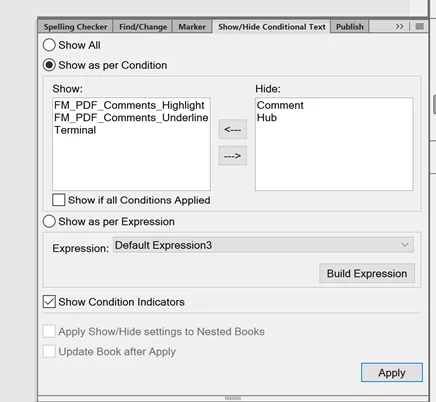
When swapping the settings from Terminal > Hub, and Hub > Terminal shown below in the Show/Hide Conditional Text window, one can click Apply and view the other version. But I must close without saving as FM prompts that there is no Undo. Doesn’t seem right. Not familiar with Expressions nor with Elements.
I’ve searched Adobe technical support. Thank you, and please advise ;o) ?
Capture of the settings:
Thank you.


 AdChoices