Inspiring
March 21, 2022
Answered

Translating DITA files - Text for Note types

  • March 21, 2022
  • 2 replies
  • 912 views

As far as I can tell, FrameMaker assigns the text and formatting for note types from the EDD, i.e., when you set the type attribute of a note to "danger", you get DANGER: as the prefix. To translate the prefixes to a different language, do I need to edit the EDD? 

    This topic has been closed for replies.
    Correct answer frameexpert

    Pardon my ignorance, but where are the text strings that I would need to translate, i.e., danger, caution, notice, etc?


    Actually, this is a little more complicated than I thought. I just checked the EDD and this is what it uses for most of the Prefix rules:
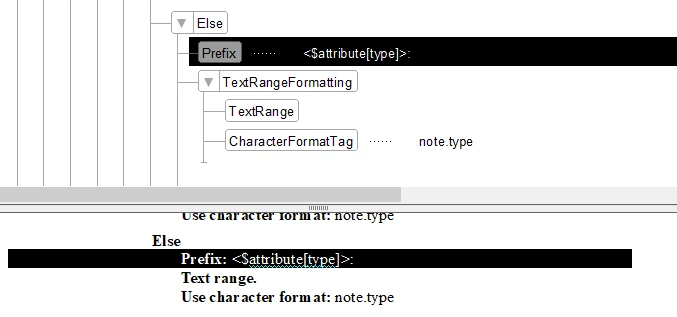
     

    This is "clever" because it simply means that if you choose type="danger", you will get the prefix "DANGER". (The note.type Character Format uses Uppercase.). The problem is that you don't want to translate all of the type choice values, because anywhere a <note> is used in a localized document, you will have to change it's attribute value. *** You definitely don't want to do this. ***


    The best approach is to edit the EDD so that it doesn't use <$attribute[type]>; instead, you will need a series of ElseIf elements: (pseudo-code) if [type="danger"] then prefix = (translated string danger).

    2 replies

    Matt-Tech Comm Tools
    Community Expert
    Community Expert
    March 22, 2022

    You might consider creating a duplicate of your structapp, with a language-specific identifier. You could then modify a language-specific duplicate of the EDD. 

    This would let you switch the prefixes by switching structapps when you open the content.

    -Matt Sullivan, FrameMaker Course Creator, Author, Trainer, Consultant
    Inspiring
    March 30, 2022

    I managed to export and modify an EDD and reimport it with the note type changes. Although that works, I can't figure out which EDD I have to modify to make the changes permanent in task, reference, and concept files because the structapps.fm does not point to any EDDs and neither do the files in ..Structure\xml\DITA_1.3\app\technicalContent\template folder. Which  EDDs do I need to edit in \Structure\xml\DITA_1.3\app\technicalContent\edd ?


    BTW: I'm currently evaluating (and struggling with) the FrameMaker DITA implementation to see if my company can use it and despite the obvious benefits, I'm seriously thinking of abandoning this project entirely and just continuing with unstructured FrameMaker because setting up the text formatting for several languages and preparing files for localization seems unnecessarily complicated. I don't have a budget for an outside consultant and IT can't support me because they don't know FrameMaker as well as I do.

    frameexpert
    Community Expert
    Community Expert
    March 30, 2022

    You need to find the appropriate DITA templates and import the Element Definitions (EDD) into the templates (File > Import > Element Definitions). The DITA template path for each topic type should be in the structapps.fm file.

    frameexpert
    Community Expert
    Community Expert
    March 21, 2022

    Yes, that is correct. These strings are set in Prefix rules in the EDD.

    Inspiring
    March 24, 2022

    Does this mean that I would have to localize the choices in the attribute list, i.e.,  1. in the following screenshot and reimport the EDD into each DITA file?


    frameexpert
    Community Expert
    Community Expert
    March 24, 2022

    It is not necessary to translate the attribute choice values.