


Inspiring
May 20, 2026
Answered

Translation Export (XLIFF1.2) - error

  • May 20, 2026
  • 3 replies
  • 48 views

When I create an XLIFF export, the exported ZIP file is empty. This happens only with one of our Books. We have successfully exported four Books, but the last export is empty.


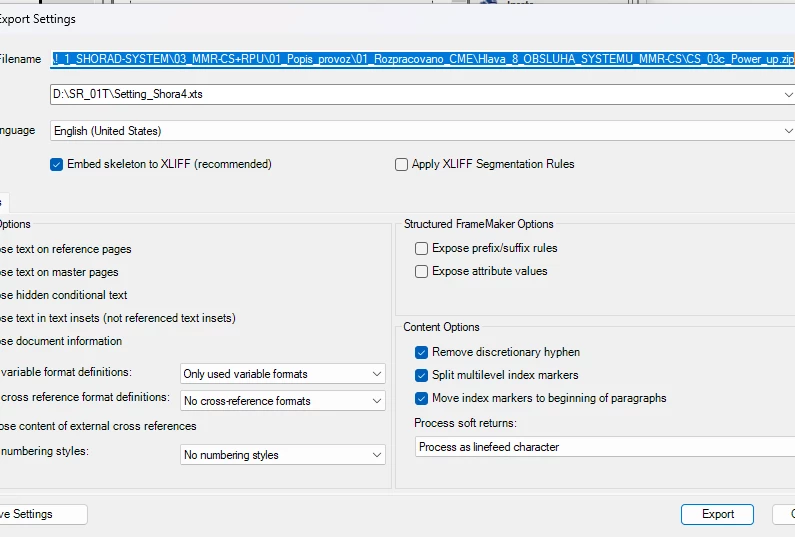
We always use this settings.
 

    Correct answer Two-fer

    I have had the same thing occur if any character in the original file name, the Zip file name or anywhere in the save location address had a 2-byte character. (In my case, it was Japanese characters.) Does the file name have any character that is not a standard English (1-byte) letter/character? (It could be a letter, a number, a dash mark, an underscore, etc.) For example: 


    3 replies

    Jeff_Coatsworth
    Community Expert
    Community Expert
    May 20, 2026

    Another suggestion for tracking down the offending content - create a new book & add one doc at a time to it, testing each time if you can create your zip file. When it blows up - do a deeper dive on that doc.

    Two-fer
    Two-ferCorrect answer
    Inspiring
    May 20, 2026

    I have had the same thing occur if any character in the original file name, the Zip file name or anywhere in the save location address had a 2-byte character. (In my case, it was Japanese characters.) Does the file name have any character that is not a standard English (1-byte) letter/character? (It could be a letter, a number, a dash mark, an underscore, etc.) For example: 


    Bob_Niland
    Community Expert
    Community Expert
    May 24, 2026

    That table looks like it might be the Windows Code Page 1252 extensions to ASCII (one of a large number of legacy overlay/codepage mappings). ASCII, per se, always has bit 8 zero, so only covers 0-127 (00h through 3Fh), and the assigned glyphs in that range are the same as for Unicode U+0000 through U+003F. As UTF-8, these are always one byte, and are indeed the safest things to use in file names.

    That table, by the way, does not completely match what Unicode has for 128-255 (U+0040 through U+00FF), but they will be two bytes each in UTF-8. Unicode at and above U+0800 will be three bytes as UTF-8, remains 3 bytes through the rest of BMP. SMP,  U+10000 and up, will be 4 bytes as UTF-8.

    Windows file name support seems to be iffy for SMP. You might get ▯▯ instead of 🅭. FM doesn’t support SMP at all yet, so file names are the least of the concerns for such characters.

    As a historical observation, ASCII arose when bit8 might have been entirely unavailable: used for parity bit, or not present at all (7-bit punched tape). ISO/IEC-8859 was an interim solution to that, but Unicode rules now.

    Jeff_Coatsworth
    Community Expert
    Community Expert
    May 20, 2026

    Since it’s not happening to all your books, there’s got to be something different about this one that isn’t working - the question is, what could that be? One thought is that path you’ve got there - it looks really really long - maybe try a shorter path to test with?