

Community Expert
April 16, 2024
Answered

Trouble shooting XLIFF

  • April 16, 2024
  • 1 reply
  • 415 views

I am exporting a FrameMaker book to XLIFF, but I get this foot note error when doing the export:
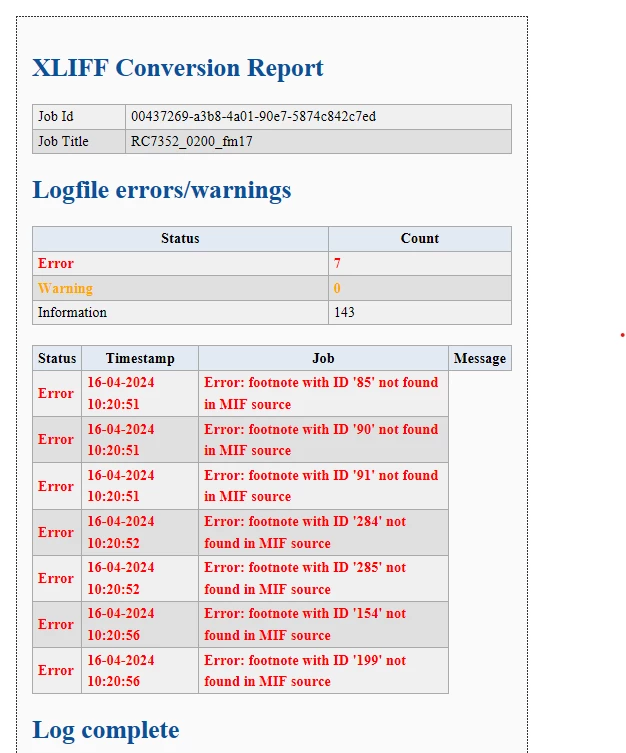
I cant' figure out how to troubleshoot this. It looks as if it actually ALL the footnotes which have this ID error. What might cause it? Any suggestions how to fix it?

    This topic has been closed for replies.
    Correct answer FrameMaker-dk

    OK. so it is exactly the same bug. When you export a FrameMaker file with footnotes inserted into tables, the XLIFF translation tool can not figure out how to properly pickup the footnote ID. The footnote ID IS in the MIF file, but FrameMakers XLIFF export tool will not register it properly and outputs an error. Importing the XLIFF will result in a blank document. Well... I have submitted yet another bug report.

    1 reply

    Community Expert
    April 16, 2024

    Hi,

    First, what's your FrameMaker version? Is this the latest update?

    Did you have a look at the MIF code? Are there any footnotes with these IDs? Do you have only these 7 footnotes in your document?

    Can you make a dummy file with footnotes and check, if its footnotes get exported correctly?

    Are these footnotes part of tables? In the Adobe Tracker there is an issue that files get corrupted.

    https://tracker.adobe.com/#/view/FRMAKER-11483

    Best regards, Winfried

    Community Expert
    April 16, 2024

    Hi Winfried. Sorry, yes: FrameMaker Version: 17.0.0.226

    Yes I have taken a look at the MIF code and it looks ok. I am not a MIF expert, though.

    I did try deleting all footnotes and that will make the xliff export/xliff import work.

    Regarding the error report you mention... I was the one who created it. And with the material I had at and at the time, I was also the one who closed the ticket. Only it seem the error has reappeared. Or perhaps it never was properly fixed.


    Bjørn Smalbro - FrameMaker.dk