

Community Expert
November 26, 2021
Answered

Trouble with korean font substitution in FM 2020
  • November 26, 2021
  • 1 reply
  • 415 views

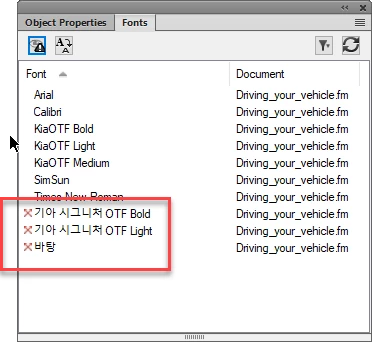
I have some korean FM documents which have been made using a corporate font. I have the proper font installed and can use it and FM recognizes it.

But when I open the documents FM looks for the korean name of the font. In order to open the documents I have to substitute the korean font name with the english font name. It is the same font file - but the documents ask for the korean name. I substitute the font - but FM won't remember the substitution. I do have "Remember missing fonts" set to On in Preferences and I do save the documents. Only FM forgets between each opening that I have substituted fonts.

These are structured FM 2020 files which have been saved as a FM book. Meaning there is no paragraph style info I can edit.

If  I can figure out how to write the korean name of the font with korean characters - can I edit the maker.ini to recognize the korean font names? ...


This topic has been closed for replies.
Correct answer FrameMaker-dk

Aha - I figured it out anyways. For those who want to know how...

The font settings with korean font names had been written into the EDD. So I exported the EDD, found the korean style font names and changed them into english style font names. Then I imported the elements back into FM and voila! Things worked and my day got immensely better!

1 reply

FrameMaker-dkCommunity ExpertAuthorCorrect answer
Community Expert
November 26, 2021

Aha - I figured it out anyways. For those who want to know how...

The font settings with korean font names had been written into the EDD. So I exported the EDD, found the korean style font names and changed them into english style font names. Then I imported the elements back into FM and voila! Things worked and my day got immensely better!

Bjørn Smalbro - FrameMaker.dk