Inspiring
January 30, 2021
Answered

Troubles with Appendix TOC in FrameMaker 2019

  • January 30, 2021
  • 4 replies
  • 776 views

Hello!

(Disclaimer: I'm pretty new to FrameMaker)

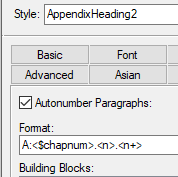
I've set up an Appendix and the numbering is working:
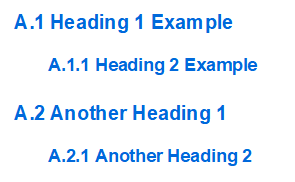
But in the TOC, things aren't working correctly:

Two problems:

1) I'd like the page numbers to say A-1, A-2, B-1, B-2 etc.

2) The numbering isn't working for the headings

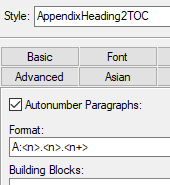
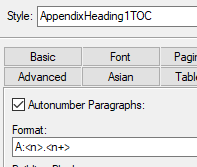
For reference, here are the TOC Paragraph styles:
     

Just in case you need them, here are the content styles:
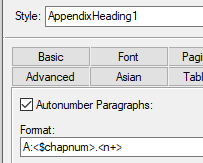
    

Thanks!

Elo

    This topic has been closed for replies.
    Correct answer Barb Binder

    Hi Elo:


    This is what @Winfried Reng was talking about in his reply.


    Disable the paragraph auto-numbering for those two styles outlined in red, and replace the 0.0.1 and 0.1 with the <$paranum> building block to pull the numbers from the source docs. Update your book. 


    ~Barb

    4 replies

    Barb Binder
    Community Expert
    Barb BinderCommunity ExpertCorrect answer
    Community Expert
    February 1, 2021

    Hi Elo:


    This is what @Winfried Reng was talking about in his reply.


    Disable the paragraph auto-numbering for those two styles outlined in red, and replace the 0.0.1 and 0.1 with the <$paranum> building block to pull the numbers from the source docs. Update your book. 


    ~Barb

    ~Barb at Rocky Mountain Training
    Inspiring
    February 1, 2021

    OH! That did the trick - thanks Barb and Winfried!

    Community Expert
    February 1, 2021

    Hi,


    Can you post a screenshot of the TOC reference page? Please with Text Symbols shown.

    The numbering in your TOC should be controlled solely by the building blocks on the reference page. You shbould not set the numbering in the single TOC pagraph formats.

    These building blocks are described in the online help:

    https://help.adobe.com/en_US/framemaker/using/index.html#t=using-framemaker%2Fuser-guide%2Ftopic_edit-special-list-and-index-text-flows.html


    Best regards


    Winfried

    Inspiring
    February 1, 2021

    Hello Winfried,

    Here's my (inherited) (chaotic) Reference page. I've highlighted the two entries for the TOC:

    Elo

    Barb Binder
    Community Expert
    Community Expert
    January 31, 2021

    Hi Elo:


    This is a three step process:

    1. As per Bob, you will need to add <$chapnum> to the TOC reference page. See https://www.rockymountaintraining.com/adobe-framemaker-including-chapter-numbers-in-a-table-of-contents/ 
    2. Add the <$chapnum> variable to the footer, in front of the page number. i.e., <$chapnum>–#.
      https://www.rockymountaintraining.com/adobe-framemaker-variables/
    3. Set the chapter number in the book window.
      1. Right click Appendix A in the book window > Numbering.
      2. Set the Chapter # back to 1, and the Format to ALPHABETIC. For appendix b–infinity, ALPHABETIC and Continue Numbering from Previous Chapter in Book.

    Update the book.


    ~Barb 

    ~Barb at Rocky Mountain Training
    Inspiring
    February 1, 2021

    Thanks Barb, 

    I had the chapter numbering set up and it works in the content, it just doesn't work in the TOC:

    thanks,

    Elo

    Participant
    April 7, 2021

    You taught me what I always wanted to know, how to properly build a new TOC numbered correctly, including appendicies. Of course this is also good for the chapter files. To all of you on this thread, thank you very much!!!

    Cliff

    Bob_Niland
    Community Expert
    Community Expert
    January 30, 2021

    If this TOC is a generated file, it will have a Reference Page "TOC", and you may need to add a <$chapnum>- in front of each <$pagenum>

    Inspiring
    February 1, 2021

    Thanks Bob - that solved problem #1 🙂