
Participant
August 3, 2016
Question

Trying to create a List of Tables and Figures looking like my Table of Contents

  • August 3, 2016
  • 2 replies
  • 1877 views

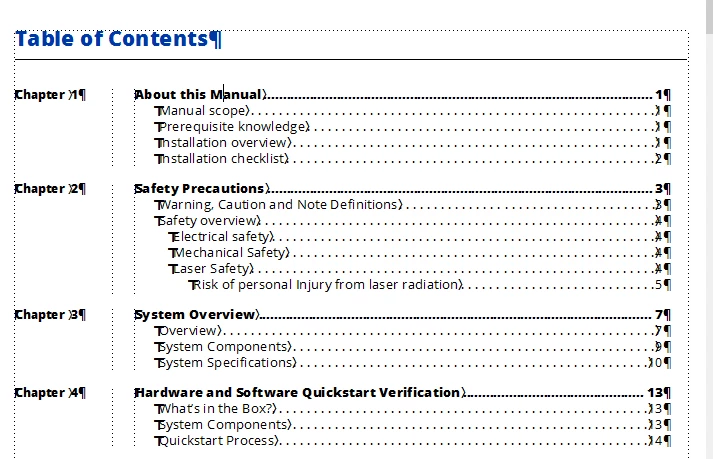
I am trying to  create a List of Tables and List of Figures that looks like my Table of Contents. My Table of Contents uses a side hide for the Chapter Number and the Chapter name  and Heading titles in the column.

                I want the List of Figures and List of Tables to use the Figure Number and the Table Number in the Side Head of their respective documents, and the Figure Captions and Table Captions in the column.

                However, In the Table of Contents the <$chapnum> building block is used to create the Chapter number in the Side Head. How can I do this for the Figure and Table lists? I am including images of what I would like generated files to look like.

    This topic has been closed for replies.

    2 replies

    Barb Binder
    Community Expert
    Community Expert
    August 8, 2016

    Are the figure numbers separate paragraphs from the the figure titles (same with table numbers and table titles), like your chapter numbers and chapter titles are? To pull them out as side-head paras, they will need to be.

    They may print on the same line in the chapters using a run in head, but they'll need to be separate paragraphs, i.e.,

    Figure 3.2¶  VLP-16 xxxxxxxxx

    ~Barb at Rocky Mountain Training
    Legend
    August 8, 2016

    I've checked one of my Lists of figures, and the building blocks are

    <$paranum> <$paratext> <$pagenum>

    The definition for the figure caption style is

    F:Figure <n+>.\t

    Hope this will at least get you started with your folio-by-chapter numbering for figures!

    Participant
    August 9, 2016

    Fiery,

    Thank you so much. This has really been a problem, because when I regenerate the book the Figure and Table numbers in the sidehead go away. I am hoping for a better solution. I will try your idea.

    Thank again,

    Barry