

Trying to get the output that I need
Hi,
I'm using this thread since I've similar problem to solve. I'm new to DITA and piloting some documents in FrameMaker 2019, trying to get the output that I need. I have created a ditamap with a structure as follows:
Ditamap title (BOOKTITLE MAINBOOKTITLE)
- Chapter 1 (topicref)
- Chapter 2 (topicref)
- Chapter 3(topicref)
- Chapter 4(topicref)
- Chapter 5(topicref)
Each of the above chapters (topics) has few more topics embedded which I use for sub-sections of the main chapter for example:
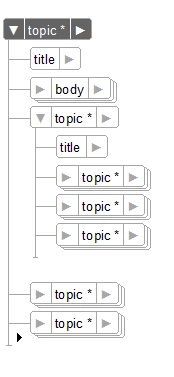
In the dita xml structure I have to have a lot of tables, diagrams and many other sub-titles with their contents. After generating an output PDF book I need to move some title in the next page or next column, depends on the situation.
I’m trying to implement a „pagebreak” function in my topic.template and edited the topic.eddmod.fm file to include text format rules just like it’s suggested in few comments above from Michael_Müller-Hillebrand. Here is a result:
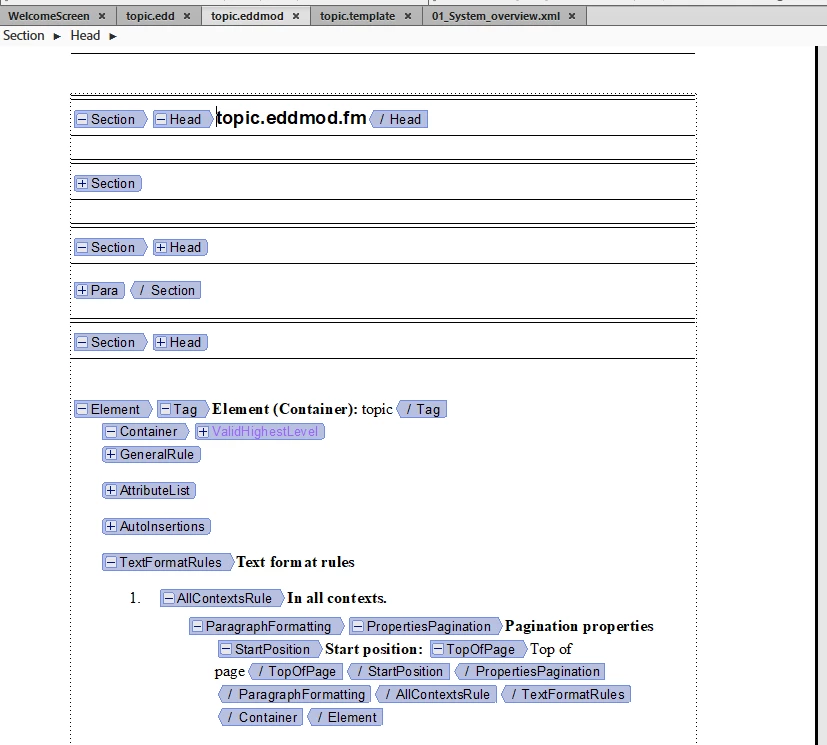
It seems actually, nothing was happen when I save the changes. Should I save as DTD this EDD file or there is something that I missed?
Thanks a lot in advance,
LA
[Moved to your own thread - Moderator: Jeff_Coatsworth]


 AdChoices