

Midacol
Known Participant
September 12, 2012
Question

Turning off Hyphenation of Words

  • September 12, 2012
  • 1 reply
  • 727 views

Hello-

I am new to Framemaker and I am trying to use it to create a user manual for my company's product.  I am struggling to find a way to turn off the hyphenation of words when the text wraps to the next line.  For example, I would prefer the words "information" and "reference" in the figure below would just wrap around completely to the next line the way MS Word does so that the words don't need to be hyphenated.
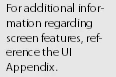
Could someone tell me how to turn off the hyphenation of text in this way, please?

Thanks-

Michael

    This topic has been closed for replies.

    1 reply

    Arnis Gubins
    Inspiring
    September 12, 2012

    Each paragraph style has its own seting in this regard. In the Paragraph Designer, turn off the Hyphenation option found on the Advanced tab.

    Midacol
    MidacolAuthor
    Known Participant
    September 12, 2012

    D'oh!  I don't know how I missed that.  Thanks!

    Bob_Niland
    Community Expert
    Community Expert
    September 12, 2012

    And, you can turn it off for the entire document.

    Click in the margin, so you aren't in a Paragraph Format.

    Format > Paragraph > Designer [ Advanced ]

    [_] Hyphenate

    [ Update All ]

    (*) Advanced Properties Only

    (*) All Paragraphs and Catalog Entries

    [ Update ]