
Unable to find a valid Installer for Adobe FrameMaker
Hi,
Licensed Windows 10 Home X64
Notebook MSI i5-8300H @2.30 GHz
RAM: 16 Go
Adobe Creative Cloud yearly subscription
Adobe FrameMaker 2019 yearly subscription
Facts:
Due to some errors received from InDesign (Database error) I had to re-install entire Adobe suite and FrameMaker 2019.
To uninstall them, I used CC Cleaner Tool offered by Adobe. I selected to clean/uninstall ALL.
Issue:
1. I cannot find a vaslid installer for Adobe FrameMaker 2019. I looked over Adobe Help webpage and I downloaded GM X64. When I tried to install it returned an error: Please update your OS or browser. WOW. Two days ago I worked on the same computer with the same settings and OS and FrameMaker 2019 worked fine. Now, it does not recognize the OS.
2. I restarted my computer, I checked to be logged on to CreativeCloud, I downloaded again the installer recommended by Adobe. I started it and this time it returned error 183. As I searched database I found an answer that stated I have to update Windows .NET Framework 4.7? When did that go deleted? Why after installing Creative Cloud suite that whatever .NET Framenetwork 4.7 did not get installed back? The link that was posetd by Adobe is no longer available. I searched the web and I downloaded .NET Framework 4.8 just to discover that in fact I have it. and I have the latest update of it.
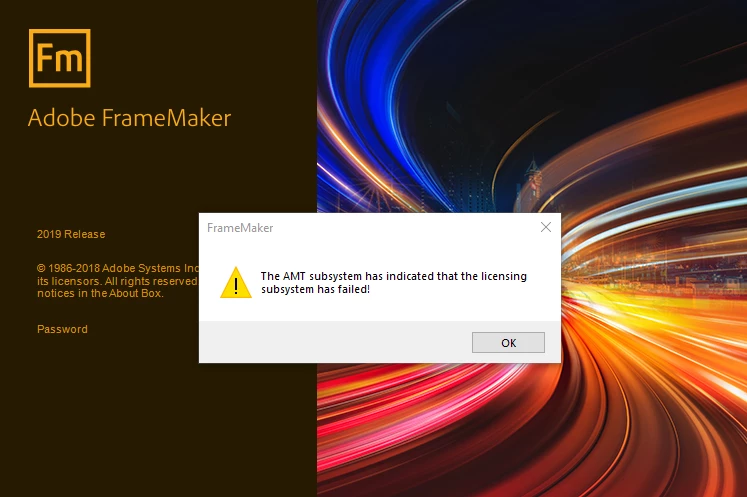
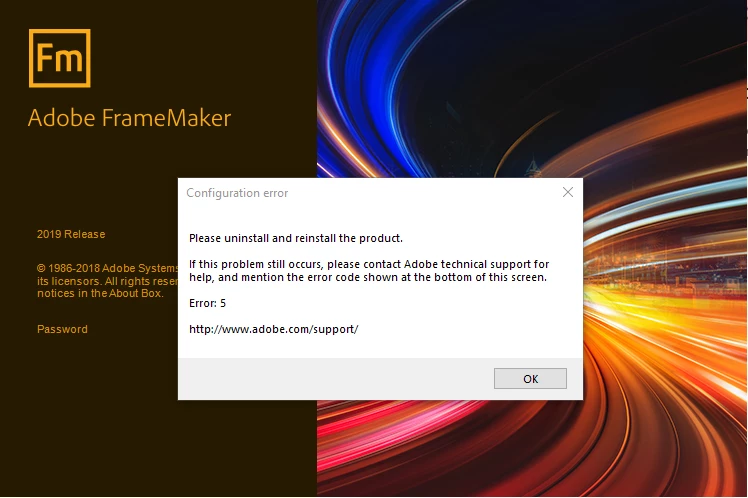
To be even weirder, suddenly all FM files have the FM icon back. I even tried to open a FM file and somehow, FrameMaker tries to open. (How if it never get installed?) But I get an error 5. "The AMT subsystem has indicated that the licensing subsystem has failed". Seriously ADOBE? I mean, I am logged on to Creative Cloud but your subsystem cannot identify me for FrameMaker?
So, I will consider that I deleted some file(s) that are required by FrameMaker to verify my credentials. A file that is not need it by Adobe Creative Cloud but solely for FM.
How can I solve that issue as I need FrameMaker to be up and running today.
Regards,
Sebastian


 AdChoices