
Inspiring
August 9, 2024
Answered

Unable to Install Frame Maker

  • August 9, 2024
  • 3 replies
  • 2083 views

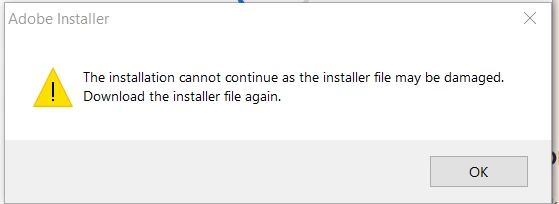
I downloaded the FrameMaker 2022 version 17.0 from official website and the downloaded file read as Framemaker_17_LREFDJ.zip. I unzipped and tried installing the app, but it throws an error that "The installation cannot continue as the installer file may be damaged. Download the installer file again."


But i have downloaded thrice and different version, still same error. Recently i changed to Dell Workstation laptop Precision 3591 with Intel core Ultra processor. Can someone help me to install the software where my office IT cant fix the issue.


Thank you in advance.
    This topic has been closed for replies.
    Correct answer Praveen Kumar S

    Finally Adobe team helped me and below is the solution it worked.

    You can try to launch the FrameMaker installer from the command prompt and can check for the issue.
    You can follow the below steps.

    1. Launch command prompt in admin mode.
    2. Navigate to the folder where the FrameMaker installer “Set-up.exe” file is located.
    3. Type the command "Set-up.exe" --silent=1, this will start the installation.
    4. Once the installation will reach 100%. You can launch the application.

    Best Regards,

    Praveen Kumar S

    3 replies

    Praveen Kumar SAuthorCorrect answer
    Inspiring
    August 13, 2024

    Finally Adobe team helped me and below is the solution it worked.

    You can try to launch the FrameMaker installer from the command prompt and can check for the issue.
    You can follow the below steps.

    1. Launch command prompt in admin mode.
    2. Navigate to the folder where the FrameMaker installer “Set-up.exe” file is located.
    3. Type the command "Set-up.exe" --silent=1, this will start the installation.
    4. Once the installation will reach 100%. You can launch the application.

    Best Regards,

    Praveen Kumar S

    Community Expert
    August 13, 2024

    Hi,

    Did you unpack the zip file and then started the setup file? Or did you start the setup file inside of Winzip (or Explorer or something similar)?

    You have to unpack the zip file into a new folder and then go to the new folder and there start the setup.

    And you have to have Admin rights.

    Best regards, Winfried

    Jeff_Coatsworth
    Community Expert
    Community Expert
    August 9, 2024

    Try downloading it again using another browser & installing it as an Admin. If it still refuses to cooperate, then give the FM folks a ping - see https://helpx.adobe.com/contact/enterprise-support.other.html#framemaker for your Adobe Support options. I'd recommend using the tcssup@adobe.com e-mail address as it reaches a team dedicated to Technical Communication Suite products including FrameMaker.

    Inspiring
    August 9, 2024

    Hi,

    I tried with 2 different browser and still the same error. Thank you for the contact will send an email and verify.


    Jeff_Coatsworth
    Community Expert
    Community Expert
    August 9, 2024

    Two possibilities - the installer file is really damaged or something in your environment is shutting down the execution of the installer.