
Participant
July 15, 2020
Question

Unable to open an MIF file from previous version

  • July 15, 2020
  • 1 reply
  • 371 views

Hey guys!


I have files created in FM 2017 version. I want to open these in FM 11. I saved them as MIF files and trying to open in FM 11 version but getting the below error. 
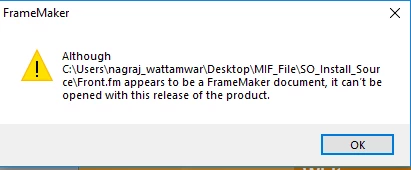
Please let me know if there is any solution.


Thanks,

Nagraj

    This topic has been closed for replies.

    1 reply

    Community Expert
    July 15, 2020

    Hi Nagraj,


    Can you open the MIF file with a regular text editor?

    The first line should be something like this:

    <MIFFile 2019> # Generated by FrameMaker 2019

    (Your version number will be different.)

    If you get just weired characters, then this is not a MIF file.

    Please save your FM file again as MIF. Change also the file name extension to mif, if this is not done automatically.


    Best regards


    Winfried

    Participant
    July 15, 2020

    Here is the first line with normal text editor:

    <Book 2017> # Generated by FrameMaker 2017. 

    Community Expert
    July 15, 2020

    I am able to open the book. I am getting the above error when I try opening the topic/file.


    Hi Nagraj,


    Please check also the first line of your FM files saved as MIF!

    Do these MIF files have all the file extension MIF?

    You might inspect the MIF files with MIFBrowse:

    http://www.grahamwideman.com/gw/tech/framemaker/mifbrowse.htm

    This is a small application to check MIF files. It's old, but it still works. No installation needed.

    Your MIF file should look similar to the screenshot on this web-site.


    Now I do not know of anything else. If the recommendations above to do not help, you might contact support: tcssup@adobe.com

    Possibly there is something in your MIF file which irritates FM 11.


    Best regards


    Winfried