
Known Participant
September 23, 2020
Answered

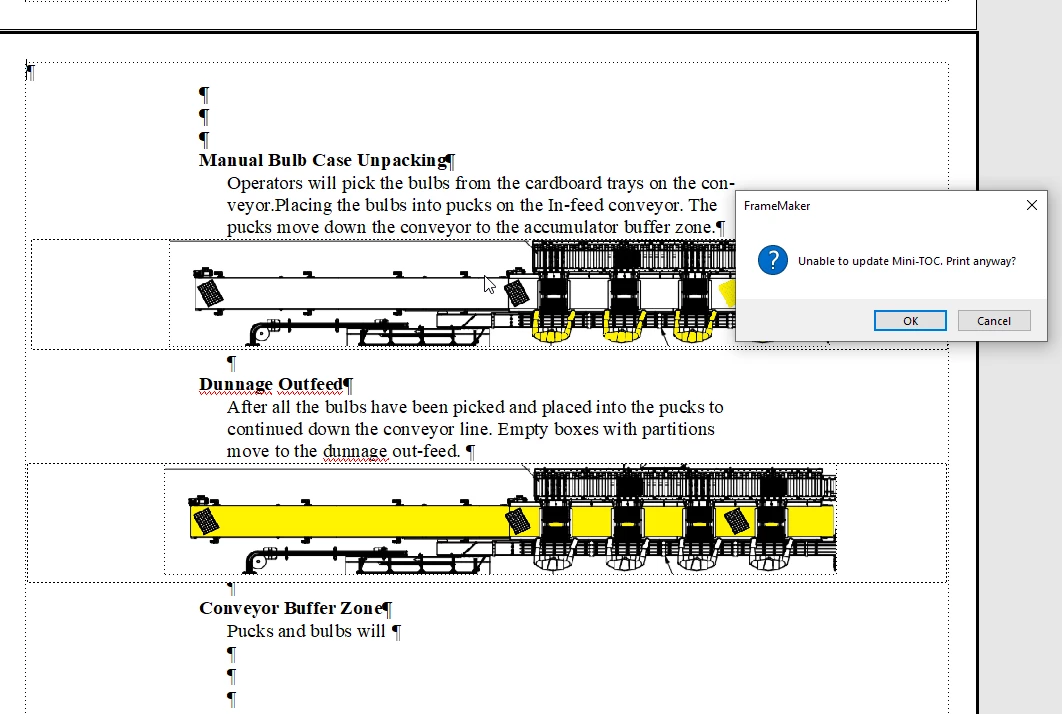
Unable to update mini-Toc.Print anyway?

  • September 23, 2020
  • 2 replies
  • 591 views

when i go to print my document to check for picture page placement, its bringing up this dialog asking about mini TOC. I do not want this document associated with a mini table of contents and i am not sure why this is appearing. When i go to search inquiry on the top of framemaker. i dont know a mini TOC to delete. is this document tied to a book somehow. i am new to framemaker and having alot of issues. thank you
This topic has been closed for replies.
Correct answer Jeff_Coatsworth

It's more likely that there's something in the template you used to create the doc has a mini-TOC reference in it. I always suggest getting a copy of Matt R. Sullivan's Unstructured FM: Publishing Fundamentals (it's old, but all the key concepts are in there) to use as your FM bible. 

2 replies

Jeff_Coatsworth
Community Expert
Jeff_CoatsworthCommunity ExpertCorrect answer
Community Expert
September 23, 2020

It's more likely that there's something in the template you used to create the doc has a mini-TOC reference in it. I always suggest getting a copy of Matt R. Sullivan's Unstructured FM: Publishing Fundamentals (it's old, but all the key concepts are in there) to use as your FM bible. 

Jeff_Coatsworth
Community Expert
Community Expert
September 23, 2020

It won't do any harm to say OK to the dialog - this doc is (or was at some point, depends on how or where it came from) part of a mini-TOC.

beau5CC8Author
Known Participant
September 23, 2020

i think i may have accidently started this document as part of a book, this will not be part of a book. should i  restart the document or will this not cause any conflicts other then instructing me everytime i would like to print? Thanks jeff for your quick reply