
thehairyone
Participant
June 23, 2019
Answered

Unable to wrap sequence of element with conversion table

  • June 23, 2019
  • 1 reply
  • 703 views

Hi,

Using Framemaker 10, I'm trying to structure a document with a conversion table. I can wrap all character and paragraph tags into an element, but the conversion seems to stop after that first step and subsequent wrapping are not executed. The resulting file have a flat structure with only one level.

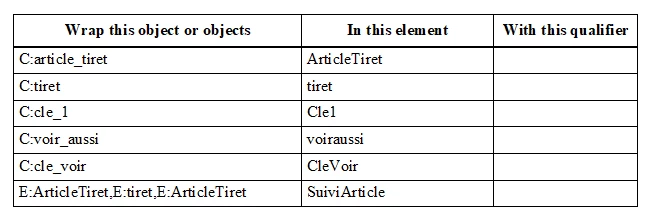
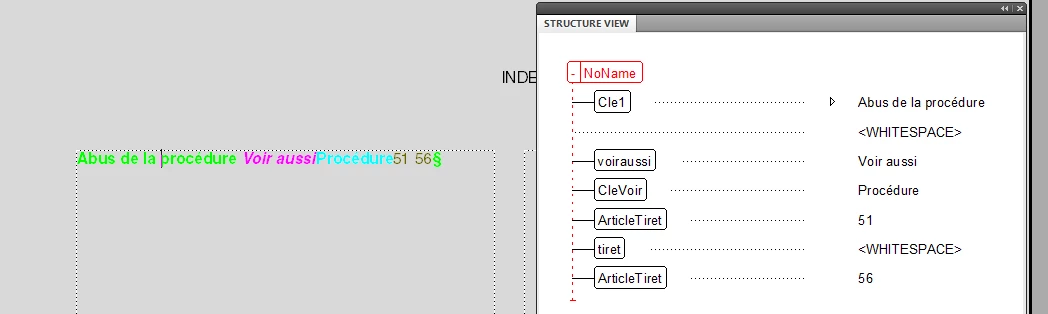
I made a sample file with 4 or 5 character tags and the corresponding conversion table, and it still does not work. Here is the samples. I'm expecting elements ArticleTiret, tiret and ArticleTiret to be wrapped in an element SuiviArticle. But as you can see, it does not work

I hope somebody will be able to help me to spot what I'm doing wrong.

File to convert:

Conversion table:
Result:
This topic has been closed for replies.
Correct answer Lynne A. Price

Hairy One,

   It seems that you have indeed encountered a bug. In particular, when a paragraph begins with multiple text ranges using different character formats, FrameMaker correctly wraps those text ranges in the elements specified in the conversion table. In your case, you obtained the sequence ArticleTiret, tiret, ArticleTiret. However, FrameMaker fails to wrap such sequences in other elements unless the sequence is preceded by another element in the same paragraph or occurs in the first paragraph in the flow.

   The problem still exists in FM 2019.

   I have filed bug FRMAKER-6696 on this issue.

   There is a workaround, but it is cumbersome:

1. Make a backup copy of your document

2, Create a new character format called something like workaround.

3. Type some text such as the word "workaround" and apply this new character format to it.

4. Copy the text to the clipboard.

5. In the Find/Change pod, type \P as the text you want to find (\P is the code for the beginning of a line).

6. Select By Pasting as the way you want to change it.

7. Click change all.

8. Add a row in your conversion table that maps character format workaround to an element of the same name.

9. Structure your document.

10. Go back to Find/Change and Find the element named workaround.

11. In the Change pull-down menu, select Text, but make sure the following text box is empty.

12. Click Change All to change all workaround elements to nothing, thereby deleting them.

--Lynne

1 reply

Lynne A. PriceCorrect answer
Inspiring
June 23, 2019

Hairy One,

   It seems that you have indeed encountered a bug. In particular, when a paragraph begins with multiple text ranges using different character formats, FrameMaker correctly wraps those text ranges in the elements specified in the conversion table. In your case, you obtained the sequence ArticleTiret, tiret, ArticleTiret. However, FrameMaker fails to wrap such sequences in other elements unless the sequence is preceded by another element in the same paragraph or occurs in the first paragraph in the flow.

   The problem still exists in FM 2019.

   I have filed bug FRMAKER-6696 on this issue.

   There is a workaround, but it is cumbersome:

1. Make a backup copy of your document

2, Create a new character format called something like workaround.

3. Type some text such as the word "workaround" and apply this new character format to it.

4. Copy the text to the clipboard.

5. In the Find/Change pod, type \P as the text you want to find (\P is the code for the beginning of a line).

6. Select By Pasting as the way you want to change it.

7. Click change all.

8. Add a row in your conversion table that maps character format workaround to an element of the same name.

9. Structure your document.

10. Go back to Find/Change and Find the element named workaround.

11. In the Change pull-down menu, select Text, but make sure the following text box is empty.

12. Click Change All to change all workaround elements to nothing, thereby deleting them.

--Lynne

thehairyone
Participant
June 24, 2019

Thank you very much Lynne. It worked!

thehairyone
Participant
June 24, 2019

Hi Lynne,

As I process a more complex file, I notice that when Framemaker wraps elements into another (ie ArticleTiret, tiret, ArticleTiret into SuiteArticle), it puts the new element SuiteArticle onto a new line, so it seems that I'm back with the same problem after one iteration: SuiteArticle is at the begining or a line, so it won't wrap. Am I right?

I'm a little baffled by this bug. I structured a couple of documents in the past years with the same version of Framemaker, with the same structure and I never encountered this problem. The only difference I can see is that I was on Windows 7 then and now I'm on Windows 10. But I doubt it could make a difference.

Thanks again for your help.