
Participant
November 28, 2023
Answered

Understanding PropVals and PropVal

  • November 28, 2023
  • 1 reply
  • 351 views

Hello,

I am trying to automate the creation of some graphic shapes in Framemaker using ExtendScript and I had trouble adjusting the Line Width of the lines.
I was thinking to check all properties of the Line Object and see which is the correct property to change.
But I cannot understand at all how the PropVals work. Each PropVal has only a num and the Value. Do they also have a descriptive name?


var graphic = null;
var doc = app.ActiveDoc;

graphic = doc.FirstSelectedGraphicInDoc;

var frameParent = graphic.FrameParent;
var lineObj = doc.NewLine(frameParent);

for(var pos = 0; pos < lineObj.GetProps().length; pos++)
{
PrintPropVal(lineObj.GetProps()[pos]);
}


I also tried the PropVal function which is confusely named that same way as the PropVal object class.
And indeed, the script fails with error "PropVal is not a function", even though in the Framemaker Scripting Guide it is listed under Function Summary.
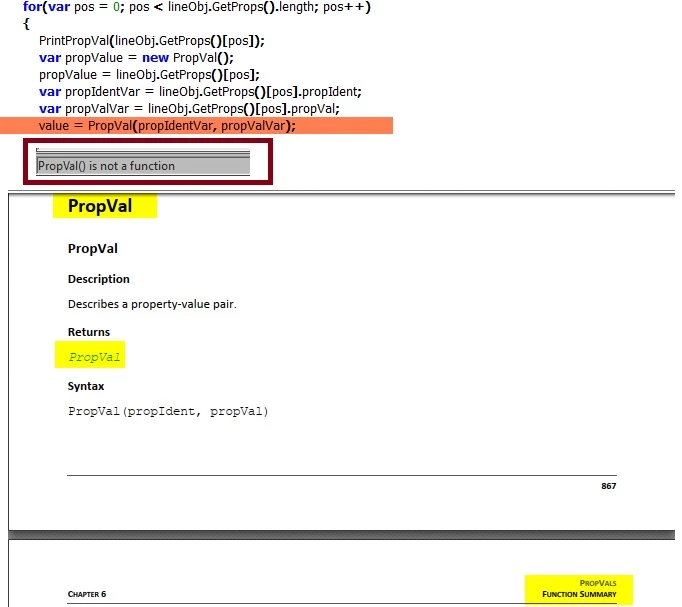


Any ideas how I can find out the correct property for Line Width? (Simply Width doesn't seem to do that)
Or any Ideas how to get the descriptive names of the object properties?

This topic has been closed for replies.
Correct answer frameexpert

You can set the line width directly using this:

// Set a constant for the point value.
var PT = 65536;
var doc = app.ActiveDoc;

graphic = doc.FirstSelectedGraphicInDoc;

var frameParent = graphic.FrameParent;
var lineObj = doc.NewLine(frameParent);
// Set the line width to 6 points.
lineObj.BorderWidth = 6 * PT;

1 reply

frameexpert
Community Expert
frameexpertCommunity ExpertCorrect answer
Community Expert
November 28, 2023

You can set the line width directly using this:

// Set a constant for the point value.
var PT = 65536;
var doc = app.ActiveDoc;

graphic = doc.FirstSelectedGraphicInDoc;

var frameParent = graphic.FrameParent;
var lineObj = doc.NewLine(frameParent);
// Set the line width to 6 points.
lineObj.BorderWidth = 6 * PT;
Participant
November 29, 2023

Thanks, that worked. Didn't consider this, because doing this graphically the property is named Line Width.

frameexpert
Community Expert
Community Expert
November 29, 2023

The same internal property is used for other graphic objects, such as Rectangles, where BorderWidth makes more sense. Have you installed the FrameMaker FDK? The documentation is much more useful than the ExtendScript documentation. Property names are slightly different (FP_BorderWidth versus BorderWidth) but you get some explanatory text. Also, the fapidefs.h C header file is very helpful for determining property names and constants values.