



TdeV1
Inspiring
September 9, 2014
Question

Understanding the Publish options in Frame 12

  • September 9, 2014
  • 1 reply
  • 553 views

My book saves to pdf and displays just fine.

Publish to ePub produces an epub with several chapters out of order.

In the Publish pod, select Settings
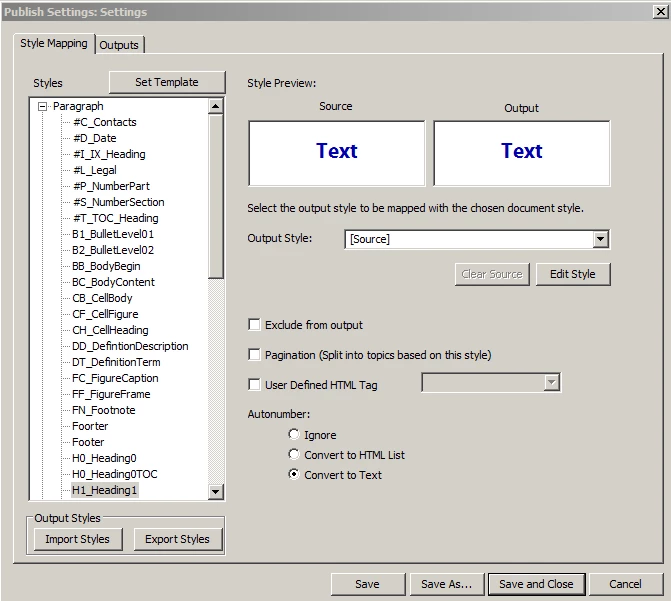
If the Output Style is selected, this is what appears
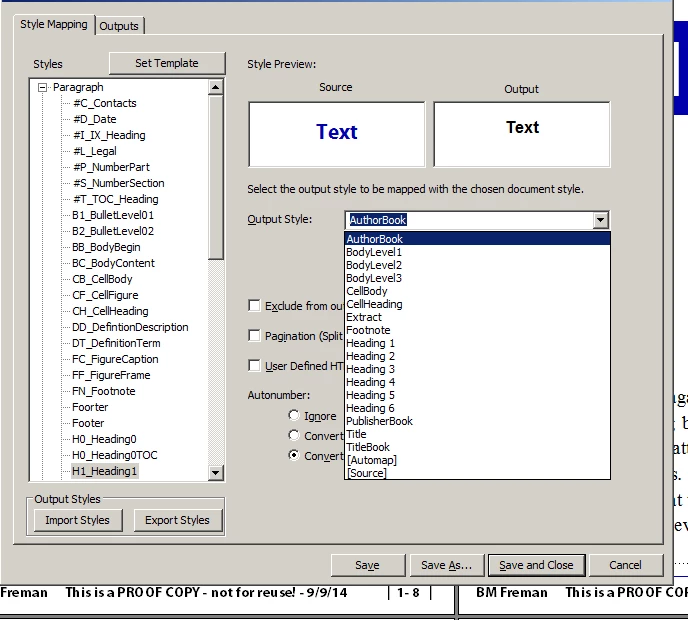
WHERE do these styles come from?


Note on the left are the paragraph tags from the current document. Where do I find the style choices from the "Output Style" pick box? How do I modify them?


P.S. THIS is exactly why I thought I had to use structured Framemaker because I thought that was the only way to tell Frame how to connect.


P.P.S. If there’s somewhere to go to read details about how to use Framemaker 12’s Publish options, please provide a link.

This topic has been closed for replies.

1 reply

Jeff_Coatsworth
Community Expert
Community Expert
September 9, 2014

What you’re seeing is a version of the RH Conversion Settings screen – this is where you tell the “engine” how to take that FM content & bust it up (Pagination), whether to bring it over to your output or not (Exclude), how lists are to be treated (Autonumber options), what the resulting styles will look like in the output (the Output Style field). You can let it take its best guess at mapping all your FM paragraph and character tags into (internal RH) styles by using the Automap setting (that was new in RH10’s guts), but you probably won’t be happy with how it comes out. The same is true of the Source option – it just takes its best guess at each mapping. What the field doesn’t tell you is that you can type overtop of it and use your “familiar” FM building blocks – I often use “<$paratext>” to map the paragraph tag text across (especially for xrefs that are like “see xx on page yy” which make no sense in WebHelp output). There are also other ways of running your FM content through to achieve what you want – check out Matt Sullivan’s blog for FM to RH integrations.

I’d recommend Willam van Weelden’s site for help with ePUB outputs (wvanweelden.eu) and Peter Grainge’s super site – grainge.org.

TdeV1
TdeV1Author
Inspiring
September 10, 2014

Thanks, Jeff, for your help (repeated). Though I can't imagine what I'd type on top of. How do I find out what Frame thinks is the appropriate mapping? How do I find out what the possible errors or permutations are?

Arnis Gubins
Inspiring
September 11, 2014

Theresa,

The Output styles that you see are just the defaults created by Adobe for the publishing stream that you're trying to output to. [We all know how excellent default values are... ]

To control what you actually get in any particular style, you have to click the Edit button (shown in the first screen capture that you posted) . This will allow you to configure each output style exactly as you want. When finished, just use the Export button to save these configurations as a custom mappings file. You can then import this into new books so you don't have to go through the whole setup process again.