Participating Frequently
April 16, 2024
Question

Update TOC change the police... How to define the TOC police ?

  • April 16, 2024
  • 2 replies
  • 634 views

Hello, 


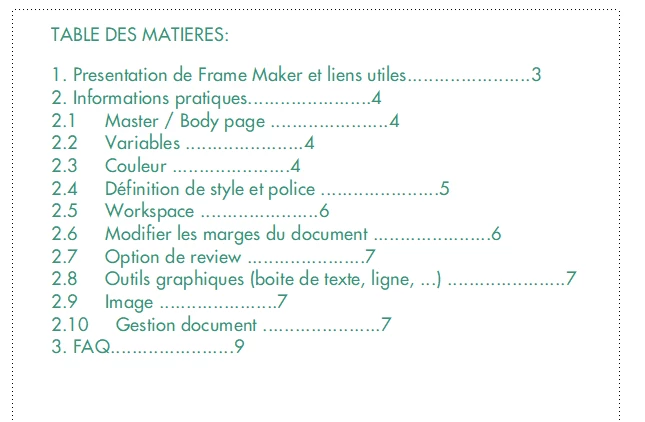
I made my TOC


but each time I update the book, it goes back to the defautl police and color. 

How can I define my police for the TOC ? 


Thanks 


Sarah 

 

    This topic has been closed for replies.

    2 replies

    Barb Binder
    Community Expert
    Community Expert
    April 17, 2024

    Hi Sarah:


    The word police in english is like gendarmes in French. That accounts for the inital confusion. It looks like you meant font or typeface


    A table of contents is a generated file in FrameMaker, and generated files follow a set of rules, listed here:
    https://www.rockymountaintraining.com/adobe-framemaker-what-to-know-about-working-with-generated-files/

    We need to memorize rules and abide by them, otherwise the generated files are a nightmare to work with.


    When you generate a TOC for the first time, you will need to define the pre-assigned paragraph styles for each level listed. For example, if the words "1. Presentation of FrameMaker et liens utiles" is a Heading1 in the source file, it will be copied to the TOC and assigned the style name Heading1TOC. Your job is to reformat Heading1TOC to look the way you want using Paragraph Designer. This includes a trip to the reference pages to add a tab stop between <$paratext> and <$pagenum> and the setting the tab positions in Paragraph Designer > Basic. See https://www.rockymountaintraining.com/adobe-framemaker-adding-tabs-to-a-table-of-contents/


    Here's another good resource to help you learn how to control the content so that updating the book doesn't cause you to lose the formatting. 

    https://help.adobe.com/en_US/framemaker/using/using-framemaker/user-guide/topic_formatting-lists-and-indexes.html#topic_formatting-lists-and-indexes


    If you get stuck on a step, you're welcome to come back and ask us specific questions. Feel free to ask in French if that's easier for you. We have a translate button. 


    ~Barb

    ~Barb at Rocky Mountain Training
    Jeff_Coatsworth
    Community Expert
    Community Expert
    April 17, 2024

    @Barb Binder - was I partially correct then? If I didn't define how Heading1TOC should look in the TOC, would I get it appearing the same as my Heading1 in the .fm files? I don't create enough TOCs from scratch to remember how it goes....😁

    Barb Binder
    Community Expert
    Community Expert
    April 17, 2024

    Hi @Jeff_Coatsworth!


    That's what InDesign would do, but not FrameMaker.


    When somebody creates a generated file for the very first time in a new book, FrameMaker makes a copy of the first non-generated file in the book window and adds the list or index content to the that new file. Because I teach this all the time, I know that it defaults to Times New Roman 12 pt, Black. But I wasn't sure if that was based on something in the first non-generated file. I just tested it and it seems like it doesn't matter how the text in the non-generated file is formatted—it still defaults to Times New Roman 12 pt, Black. It's certainly possible that it is picking up that information from someplace else in that file, but I can't figure out where. 


    The important thing, of course, is that in the new generated file, we need to redefine the generated styles to look the way we want in Paragraph Designer. Once that's done, we can update the book as much as we want and the paragraphs will always remember their formatting. 


    In @sarah34109135ewo0's case—without seeing her file—I'm guessing the text is formatted using Apply and not Update Style and that's being lost after each update. Sarah: if I'm guessing correctly, Apply introduces overrides, and Update Style updates the definition for the entire document. I'm guessing you've already met with Rick, so I wasn't going to go into more detail but of course, if you need more information, please reach out to us.


    ~Barb


    ~Barb at Rocky Mountain Training
    Jeff_Coatsworth
    Community Expert
    Community Expert
    April 16, 2024

    I think something is being lost in translation. Are you applying some formatting to your generated TOC document in some way that is getting lost when you re-generate?

    Participating Frequently
    April 16, 2024

    To be honest, I don't know. I did generate the TOC and from there I update it but each time I am losing the police... 

    Jeff_Coatsworth
    Community Expert
    Community Expert
    April 16, 2024

    What does "losing the police" mean? Can you explain what exact steps you are doing? (maybe with screenshots?)