
Known Participant
March 4, 2020
Answered

Updating to latest version

  • March 4, 2020
  • 1 reply
  • 1207 views

Hi,

I need to convert FM 7.1 version files to FM 2019 version files.

1) I want to know is there any batch process option is available????

2) When converting  to 2019 version i am getting some error mainly graphic image see the below image for your reference.
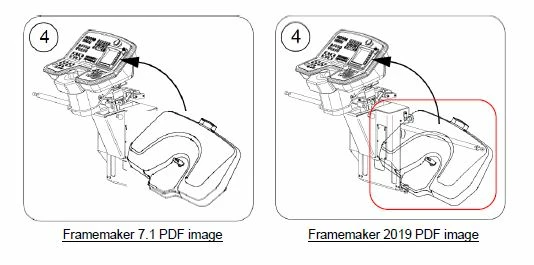
If any body knows the solution, reply to this message.

thanks in advance.


This topic has been closed for replies.
Correct answer pulkitn

Hi @vinoth03 


There is a utlity shipped with product  named "BookComponentMifWash" .

Kindly enable this utility by registering it in FrameMaker .

Run this utility on your Parent Book and it will convert all your ".fm" files to newer version.

There will be some intermediate file (.mif) , You can delete that .


Note : For precaution kindly take backup of your source files 


For more insight and queries on this  , you can contact tcssup@adobe.com


-Pulkit 

FM Engg.

1 reply

pulkitn
Adobe Employee
Adobe Employee
March 4, 2020

Hi @vinoth03,

Does your Image has trasperency ?

Could you try tweaking with Object properties of Image file .

Try with tweaking  opacity %


Known Participant
March 4, 2020

Is there any batch process is available for convert FM 7.1 to 2019 version????


pulkitn
Adobe Employee
pulkitnCorrect answer
Adobe Employee
March 4, 2020

Hi @vinoth03 


There is a utlity shipped with product  named "BookComponentMifWash" .

Kindly enable this utility by registering it in FrameMaker .

Run this utility on your Parent Book and it will convert all your ".fm" files to newer version.

There will be some intermediate file (.mif) , You can delete that .


Note : For precaution kindly take backup of your source files 


For more insight and queries on this  , you can contact tcssup@adobe.com


-Pulkit 

FM Engg.