Participant
September 26, 2024
Answered

Usage of Reference Page option

  • September 26, 2024
  • 3 replies
  • 327 views

I would like to know how to insert an image on the reference page in Adobe FrameMaker. Could you outline the steps involved and explain the benefits of using this feature. 

    This topic has been closed for replies.
    Correct answer FrameMaker-dk

    1: Open a FrameMaker document

    2: Go to the Reference Pages. View->Reference Page

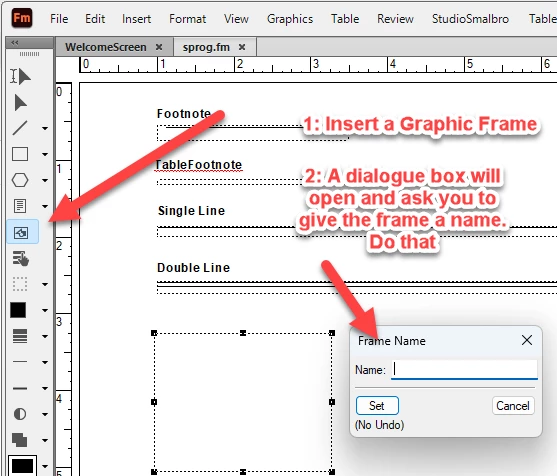
    3: Proceed like this:


    4: Import an image into the new graphich frame. Activate the graphic frame using your arrow cursor. Go File->Import->Image and select the image you want to display in the graphic frame.

    5: Save the document and go back to the body pages View->Body page
    6: Put your cursor in a paragraph and open Paragraph Designer Ctrl+M

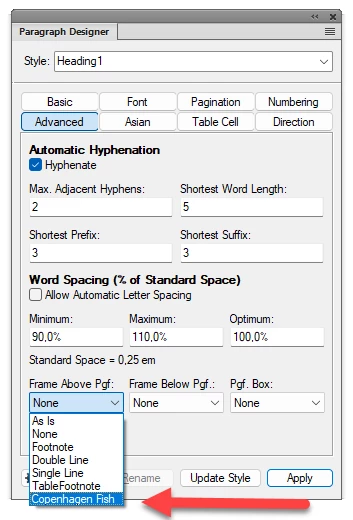
    7: In the Advanced tab you can now select a Frame Above or Frame Below a Paragraph like this. I have called my graphic frame "Copenhagen Fish" and it can now be selected and added above or below the paragraph.


    3 replies

    FrameMaker-dkCommunity ExpertCorrect answer
    Community Expert
    September 27, 2024

    1: Open a FrameMaker document

    2: Go to the Reference Pages. View->Reference Page

    3: Proceed like this:


    4: Import an image into the new graphich frame. Activate the graphic frame using your arrow cursor. Go File->Import->Image and select the image you want to display in the graphic frame.

    5: Save the document and go back to the body pages View->Body page
    6: Put your cursor in a paragraph and open Paragraph Designer Ctrl+M

    7: In the Advanced tab you can now select a Frame Above or Frame Below a Paragraph like this. I have called my graphic frame "Copenhagen Fish" and it can now be selected and added above or below the paragraph.


    Bjørn Smalbro - FrameMaker.dk
    Community Expert
    September 27, 2024

    Hi, @Ramachandra M34846246ibb7 ,

    what is your level of experience with FrameMaker?

    If you have none, it is difficult to impossible to answer your question as you have no idea about the concept of FM.

    So any answer must start at the very beginning of FM, that is not possible in a forum like this.

    As @Winfried Reng wrote start with the FM help, a tutorial or - if you want/must work professoinally with FM - book a course to learn how to work with FrameMaker.

    Regards

    Stephan

    Community Expert
    September 26, 2024

    Hi,

    Did you read the online help? It does not have a good reputation, but in my opinion it's rather good.

    https://help.adobe.com/en_US/framemaker/using/index.html#t=using-framemaker%2FFrameMaker-2022%2Fuser-guide%2Ffrm_page_layout_pl-reference-pages.html

    It explains in detail the steps to create a reference frame. and to import a graphic into this frame.

    You can insert this reference frame automatically at the top or bottom of a paragraph. I use it to insert warning icons with my warning paragraphs.

    In the Paragraph Designer go to the Advanced tab. In Frame Above/Below Pgf you can select a named reference frame. Just experiment with both options.

    You can also use an empty paragraph for this. And also set the font size to 2 pt, so that you do not create empty lines.

    Of course everything is explained in the online help, but at the moment I get a 404 warning, when I want to open certain pages in the online help.

    You can download the PDF of the online help and then search the PDF for "Frame Above Pgf" or "Frame Below Pgf".

    Go to this page:

    https://helpx.adobe.com/framemaker/help/help-resources.html

    At "Offline Help manuals" you can download the PDF.

    Best regards, Winfried