Inspiring
April 25, 2019
Answered

Using conditional text to highlight content

  • April 25, 2019
  • 4 replies
  • 483 views

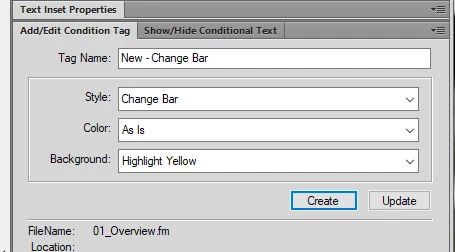
I am trying to highlight text in the document in 2015 using conditional tags and it doesn't highlight the text:

    This topic has been closed for replies.
    Correct answer Subguy617

    Track changes solves the issue I am looking to resolve with the engineers. Thank you for your help

    4 replies

    TomSchenck
    Inspiring
    April 26, 2019

    Check that the condition indicator is on. View > Show Condition Indicator

    ...and don't forget to hide them before you print/publish

    Subguy617AuthorCorrect answer
    Inspiring
    April 26, 2019

    Track changes solves the issue I am looking to resolve with the engineers. Thank you for your help

    Subguy617Author
    Inspiring
    April 26, 2019

    Thank You, sorry wrong forum

    Legend
    April 26, 2019
    1. set up a condition tag
    2. apply this condition tag to selected content

    I think you may have missed the second step :-}

    Peter Grainge
    Community Expert
    Community Expert
    April 25, 2019

    What operating system are you using and how are you accessing that dialog?

    Tags are not about highlighting text but to create expressions to include or exclude content. Content that is tagged is shown by a line above the text.

    Also I see you the file has the .fm extension which is for a FrameMaker document, not a RoboHelp topic.

    Can you please give some more information to clarify things?


    See www.grainge.org for free RoboHelp and Authoring information.

    @petergrainge

    Use the menu (bottom right) to mark the Best Answer or Highlight particularly useful replies. Found the answer elsewhere? Share it here.
    Jeff_Coatsworth
    Community Expert
    Community Expert
    April 25, 2019

    Whoops, looks like Subguy617​ posted in the wrong forum - let me move it over to the FM forum now.

    Subguy617Author
    Inspiring
    April 26, 2019

    Thank you