
Inspiring
November 3, 2021
Question

Using Graphics as a table title and cell object

  • November 3, 2021
  • 7 replies
  • 703 views

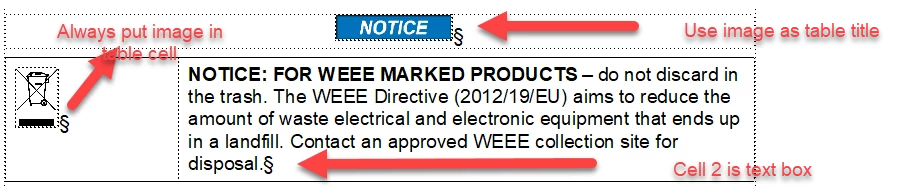
I am trying to build tables that act as objest so that I can insert them at will and not have to build it every time I need to insert one into  a document the attached image is what I am trying to acomplish. I tried creating an object or a reference frame but would really like to make a table so that cell 2 expands as the text is typed into the cell
 

This topic has been closed for replies.

7 replies

Barb Binder
Community Expert
Community Expert
November 4, 2021

Yes to both questions, Dustin.


You can define a new para style for the table title—assuming other "normal" tables are already using TableTitle with text—and assign a frame above paragraph to reference the desired graphic. 


The graphic alignment of both graphics will be dependent on the paragraph alignment. Just set them both to center. 


~Barb

~Barb at Rocky Mountain Training
LinSims
Community Expert
Community Expert
November 4, 2021

Lots of good answers here, so I'll just append this as a thought-to-have. I use the Auto-Text plugin from Silicon Prairie for this sort of thing. It lets you set up a separate FM document with text (formatted & unformatted), graphics, anchored frames, and predefined tables and gives you a menu item to use to insert them. Very useful, and only $10.

frameexpert
Community Expert
Community Expert
November 4, 2021

I agree with Lin. Auto-Text is a very useful plugin for insertion of boilerplate content. I have used it on past projects. I am a scripter but firmly in the "why reinvent the wheel?" camp.

Dave Creamer of IDEAS
Community Expert
Community Expert
November 4, 2021

Table styles can "remember" what paragraph styles are used in them, so with a little setup, you can get this upon inserting the table:

With text added. (I didn't know if the WEEE text was part of the Notice table or not.)

I've attached the file for your reference (along with other samples I've used).

I couldn't upload the .fm or .mif file. Message me and I'll send you the file.

David Creamer: Community Expert (ACI and ACE 1995-2023)
Bob_Niland
Community Expert
Community Expert
November 3, 2021

There's no reason why you can't define a customer Table type with default ¶TableTitle or ¶CellHeading that uses the FrameAbove feature to pull in the ISO/ANSI admonishment art from a Reference Page. FA from RP is how I used to do it in an FM7 production environment. Perhaps as a 3-column table with the larger right narrative column as a Straddle.


But, if only because FA only does Above or Below, I'd be tempted to look at using FM's background color feature, or table cell fill, to do it as an Autonumber (with no further text) these days. For WARNING & DANGER, use \u26a0 (⚠) as well.

Barb Binder
Community Expert
Community Expert
November 3, 2021

Hi Dustin:


In addition to using a text inset, you could build the table on the reference page and just copy/paste it to a body page and then update the content. 


Or, you could also create the first table, using Frame above Paragraph for the title and stub cell to add the graphic. This post is similar to what you need, but you also need to reference a graphic in the title: https://www.rockymountaintraining.com/adobe-framemaker-icons/


When you give this table a unique table style name and update it, you can add new tables with the same style in that document and Fm will copy the table structure automatically.


~Barb

~Barb at Rocky Mountain Training
Inspiring
November 4, 2021

Barb, 

Reading through your linked article and I was wondering if tyou know of any way to make the table title an image? The rest of this article is perfect for what we are trying to acomplish thank you. 

Inspiring
November 4, 2021

Additionally is there a way with the method you reccomended to center the image in a straddled cell? I put the image "Frame Above Pgf" but it aligns it to the left. If there is a way to make that centered then this would solve my problem. 


Jeff_Coatsworth
Community Expert
Community Expert
November 3, 2021

AFAIK you just create a new FM doc with your table in it & save it off with some meaningful name. Then when you want to use it in another doc, you just insert the file as a text inset.

Jeff_Coatsworth
Community Expert
Community Expert
November 3, 2021

What about creating it as a separate document and using it as a text inset?

Inspiring
November 3, 2021

I am not sure how that works, but I am certainly open to suggestions. Could you give me a run down of how that would be set up and implemented?