
Timothyc55
Known Participant
June 21, 2019
Question

Using OR (|) indicators in a specification

  • June 21, 2019
  • 1 reply
  • 698 views

I am using FrameMaker 2019.

Page 257 of the "Developing Structured Applications" Guide (2015) covers the use of OR indicators within a specification for a Context Rule.

I have attempted to make use of this with the following:
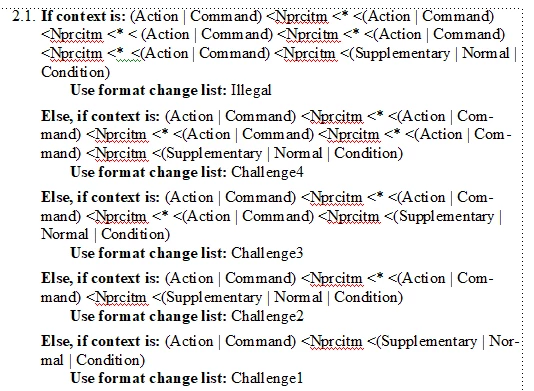
This appears to work OK when All the (Action | Command) tests finds all Action elements or all Command elements.

Action        

               Action

                              Action

                                             Action

Or

Command

                    Command

                                        Command

                                                            Command

However if the results a mixed e.g.:

Action

               Command

                                       Action

                                                       Action

The rules seem to work on the first element in the (Action | Command) pair i.e. It finds the first Action element but fails to find the second Command element.

Is this a feature or a bug?

This topic has been closed for replies.

1 reply

Inspiring
June 21, 2019

Timothy,

   Can you send a screen capture of the Show Element Context window when the insertion point is in an element that does not format properly? You can open this window with Structure > Show Element Context.

    Meanwhile, over the weekend, I will try to find time to create a test EDD based on the information you have provided and see if I can duplicate your problem.

     --Lynne

Timothyc55
Known Participant
June 23, 2019

Thanks for the reply.

Here is the relevant set of rules you requested.

You should note that anywhere you see <AA means that the rule will not work <AA is a test rule I am using. In this case I hadcreated some rules to work around my problem. However they provide an indication where the OR cases fail.

Inspiring
June 24, 2019

Timothy,

    First, I created a test case that is much simpler than yours. I found that context specifications such as:

        (s1 | s2) < * < (s1 | s2) < * < (s1 | s2)

sometimes work and sometimes don't, even when used to format an element that has both s1 and s2 ancestors. However,

    (s1 | s2) < (s1 | s2) < (s1 | s2)

worked (although it might not be what you want to test). Also,

    s1 < * < s1 < * s1

also worked in all my test cases. Thus, the problem isn't just the OR indicator, the wildcard, or a context involving different types of ancestors. I was unable to come up with a description of what causes the failure.

  I filed my test case with bug FRMAKER-6701.

  Second, your context rule is unusually complicated. Is it necessary to explicitly list so many ancestors? When elements can an asterisk represent? Depending on the way your various elements can nest, you might be able to use a level rule instead of a context rule. Based on your initial message, I tried a test using the element definition:

Element (Container): Challenge

    General rule: <TEXT>

    Text format rules

    1. Count ancestors named: Action

                                                Command

        If level is: 0

              No additional formatting.

        Else, if level is: 1

             Use format change list: Challenge1

        Else, if level is: 2

             Use format change list: Challenge2

        Else, if level is: 3

             Use format change list: Challenge3

        Else, if level is: 3

             Use format change list: Challenge4

        Else

             Use format change list: Illegal

This rule was sufficient for my test case, but may not address all the possible variations you need to support. Good luck,

    --Lynne