TdeV1
Inspiring
May 26, 2014
Answered

Using pdfs in Frame12...need some spooky music

  • May 26, 2014
  • 1 reply
  • 426 views

1a. The original pdf is an outline drawing from google maps done in Generic CAD. As part of that process, the original pdf also had a title, a ruler to measure the map, and some notes at the bottom.

1b. This drawing was cropped using Adobe Acrobat XI tools.

2a. The second file is a Frame 12 document which has the cropped pdf from Item 1 on the master page.

2b. On the body page are some hundreds of numbers (dots on the map).

2c. This looks just great in Frame.

3. Save as pdf in Frame brings the uncropped image from Item 1a as part of the pdf from 2c.

4. The pdf generated in item 3 will be inserted as an anchored frame in a new document.

How to fix #3. Then I'll have to figure out #4.

Thanks in advance.

This topic has been closed for replies.
Correct answer Arnis Gubins

Just a reminder, the pdf from # 1 is a map.

When I replaced the master page of the old pdf with the new eps, I got a large grey box.

On the body page are a pile of numbers (locations on the map) which I could NEVER have done with a grey box as a reference.

However, when I saved the Frame document as pdf, it correctly brought only the cropped earlier image.

This solution would not be workable if I needed to add more locations to the map. When that happens, I guess I'll have to travel in reverse and swap the .eps for the .pdf?

Is there a better solution for this?

Thanks in advance.


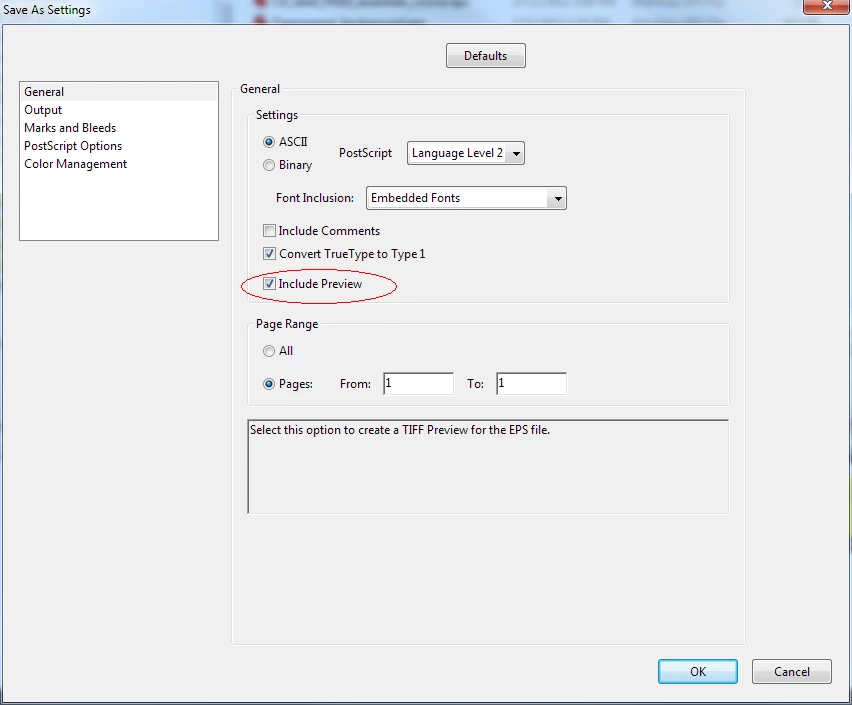
When you create the EPS from Acrobat, you have to specify that a preview image is to be created. Click on the Settings... button to and then select the "Include Preview" option from the General set of options.

1 reply

Arnis Gubins
Inspiring
May 26, 2014

Once you've cropped the PDF in Acrobat, use the Save As option to save it as EPS. This will only export the content that is within the cropped window. Use this EPS instead.

TdeV1
TdeV1Author
Inspiring
May 26, 2014

Thanks.

Sadly I have posted this question in the Acrobat forum and frameusers.com, so we'll probably be hearing about this a few times!

TdeV1
TdeV1Author
Inspiring
May 26, 2014

Just a reminder, the pdf from # 1 is a map.

When I replaced the master page of the old pdf with the new eps, I got a large grey box.

On the body page are a pile of numbers (locations on the map) which I could NEVER have done with a grey box as a reference.

However, when I saved the Frame document as pdf, it correctly brought only the cropped earlier image.

This solution would not be workable if I needed to add more locations to the map. When that happens, I guess I'll have to travel in reverse and swap the .eps for the .pdf?

Is there a better solution for this?

Thanks in advance.