
Known Participant
April 12, 2020
Question

Vertical align lost in table cells when publishing to responsive HTML5

  • April 12, 2020
  • 1 reply
  • 740 views

Hi there

I'm working on a very simple project with FM 2019: 1 page with 1 table using the default style "Format A".

The paratag "Cellbody" has "Cell vertical Aligment" set to "middle" and it works in Framemaker.
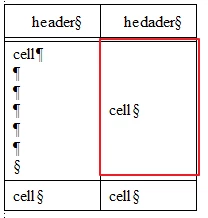
 

But when I export to responsive HTML5, FM sets the css vertical-align property to "top".
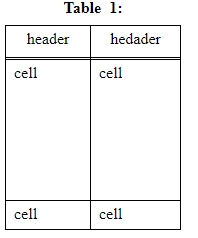
.td3 {
width:72.000pt;
border-top-style:solid;
border-top-width:1px;
border-top-color:#000000;
border-right-style:solid;
border-right-width:1px;
border-right-color:#000000;
border-bottom-style:double;
border-bottom-width:3px;
border-bottom-color:#000000;
vertical-align:top;
padding-left:6.00pt;
padding-top:3.00pt;
padding-right:6.00pt;
padding-bottom:3.00pt;
}


Am I missing some point? Is this a bug?

Thaks a lot for your time  


    This topic has been closed for replies.

    1 reply

    Matt-Tech Comm Tools
    Community Expert
    Community Expert
    April 14, 2020

    Hi Oscar, 

    What's the HTML look like for the text in the cell with red outline? I suspect the .td3 is not what the vertical-alignment is pulling from. 

    Are you familiar with Chrome's Inspect feature? This would allow you to see the formatting rules applied to that part of your page. To use this, open the page in chrome, then right-click on "cell" and choose Inspect

    -Matt Sullivan, FrameMaker Course Creator, Author, Trainer, Consultant
    Known Participant
    April 15, 2020

    Hi Matt!

    I used Inspect feature and yes, it's td3.

    All this stuff seems very strange to me. I tried to import with Robohelp with same results:

    First I made a table style "myTable" in default.css with vertical aligment property set to center. Nothing more. I imported mydoc.fm file and set de fm style "Format A" to "myTable". Nothing more.


    In Robohelp, the table's html is:

    <table border-spacing="0" dir="ltr" class="table0 myTable" border-collapse="collapse" style="" width="100%" cellpadding="1">


    and the cell is:

    </td>
    <td class="td3">
    <p dir="ltr" class="FM_CellBody">cell</p>
    </td>


    I don't know "table0" and "td3" classes are come from, my style is myTable, but in the css created by Robohelp (mydoc.css), td3 is:

    .td3 {
    width: 72.000pt;
    vertical-align: top;

    In "Other styles" section there a bunch of styles (.tr1, .td3, .tr3 etc.) that RoboHelp creates by itself.


    But there is more!! If I override this particular cell style in FrameMaker with vertical aligment property set to center (now the style is set to botton for the example), then the html in RoboHelp is

    <td class="td4">
    <p class="FM_CellBody" dir="ltr">cell</p>
    </td>


    and mydoc.css has a new style

    .td4 {
    width: 72.000pt;
    vertical-align: middle;
    }

    Now vertical-align is middle and the html looks ok.


    Thanks a lot for your time Matt.

    Matt-Tech Comm Tools
    Community Expert
    Community Expert
    April 17, 2020

    It sounds like you got it fixed, but two thoughts (from a non-expert in CSS)

    First

    You don't have CellBody mapped directly to something in your CSS. Mapping that directly gives you more control over what you can do.

    The <p> will be senior to the <td> in terms of formatting. So mapping directly and being aware of what comes from the p.FM_CellBody (or whatever it is after you map it in the Publish pod settings) will help you control it.

    Second

    Tables are one thing I never get perfectly under control. One thing is that for properties you don't explicitly specify (in the CSS, not in FM) can be controlled by a sort of browser default setting, which seems rarely to be what you'd want.

    Hopefully, you've got what you need for today, but going forward, knowing how the mapping and the cascade work (including the browser default settings) will take you a long way toward solving "the next" problem.

    -Matt Sullivan, FrameMaker Course Creator, Author, Trainer, Consultant