
eun kyeong lee
Participant
June 3, 2016
Question

visio 2013 import error

  • June 3, 2016
  • 5 replies
  • 1367 views

hi,

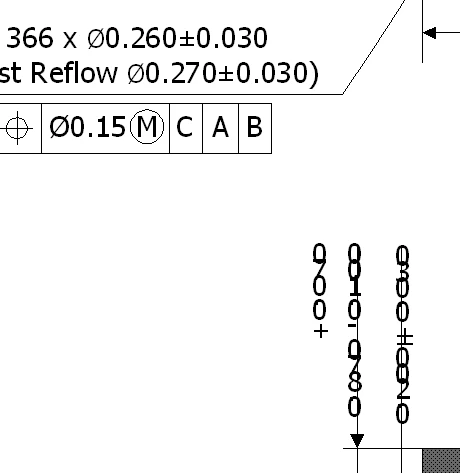
But it is currently using the VISIO2013 version, as described below, garbled When you import a visio file from frame maker has occurred.

Although the character was turned into a vertical is cracked all, this is a problem that occurs in the version of 2013, and to wrote the 2003 version wrote the 2013 in the past for the same reason. (current version : framemaker 9.0)
    This topic has been closed for replies.

    5 replies

    Inspiring
    January 10, 2017

    It looks to me as if the wonky vertical text in the preview we see in Frame is an Adobe problem - it's creating an EMF from the Visio file, and it's doing it wrong.

    Even if that's due to MS changing something about VSD files, it's beholden upon something calling itself a "VSD to EMF Import Filter" to be able to cope with that...

    Inspiring
    January 10, 2017

    I'm using FrameMaker 2015 and Visio 2010 at this particular client's site.  I actually tried OLE importing one today, and it worked fine - so we thought maybe there was no need to do an intermediate PDF.

    The main worry we had was the OLE breaking in future, if the document is moved to a new filesystem - it's not clear how the OLE link is specified (relative addressing or absolute). If you right-click on the anchored frame, it doesn't tell you what the name of the VSD file is or where it lives.... you need to save as a MIF to do that, and the MIF seemed to contain both a relative address and a UNC path in both full and DOS 8.3 formats...

    Bob_Niland
    Community Expert
    Community Expert
    January 10, 2017

    re: The main worry we had was the OLE breaking in future...

    OLE is inherently broken.
    Re: Cannot invoke OLE server Error Message

    Re: FM 9, limitations for text insets or OLE objects
    Re: When I look at linked Visio (2013) images in Framemaker 11, the text is corrupted. If I click on the image, and go …

    Export from Visio to SVG (or PDF or EPS if you can't). Export to whatever tracked/logged repository you use for imported objects. Import that object to FM.

    Legend
    January 12, 2017

    fwiw, in other environments I've found it impossible to use Visio's own .svg files because of all the Visio name-space cruft in the code. Sometimes it's enough to wrap a wet towel round my head and remove all the v: stuff in a text editor, other times I'll play safe and go via .eps

    Inspiring
    January 10, 2017

    Did this bug ever get reported to Adobe, and have they responded?

    Despite Jeff's unhelpful dismissals, it seems to be quite a general problem...

    Jeff_Coatsworth
    Community Expert
    Community Expert
    January 10, 2017

    Sorry feline_1973 - my chiming in was only to remind feknight8 not to double post - they had already posted the same content over on the other thread (& received answers that indicated that it was a MS problem - not Adobe's).

    Anyways, the OP on this thread was using FM9 - what version are you using? (is it the most current FM2015?) If you aren't using the most current version, there's very little chance that Adobe will be inclined to fix it in older versions.

    Arnis Gubins
    Inspiring
    January 10, 2017

    FWIW, Microsoft has already stopped supporting OLE techology as of 2/1/2001 (search Microsoft's Lifecycle Policy pages: https://support.microsoft.com/en-us/lifecycle/search?alpha=Microsoft%20OLE  and also see: https://support.microsoft.com/en-us/kb/86008 ), so even though this proprietary technology still works in some products, I wouldn't recommend relying on it.

    Further, as Robert indicates, it is quite wonky and has always been problematic with FM. You may be lucky in some situations, but then it turns around and bites when you least expect it.

    The PDF/EPS two-step, may seem like a bit of a pain, but it is the most reliable route to insert high-quality Visio graphics in FM.

    Inspiring
    September 9, 2016

    My problem is similar.  When I updated from Win 7 to Win 10, many of my imported Visio diagrams broke.  Specifically, the vertical text that is rotated 90 degrees, now isn't rotated anymore.  So it creates an unreadable mess. I import these files as linked OLE objects. In Visio, they are fine.  I've tried FM9, 10, 11, and 12.  They all do the same thing.  But in Visio 2007 and Visio 2016 (which I was forced to get after updating to Win 10 with Office 365) it looks fine.

    My document is over 1000 pages with 100s of these kinds of figures, so I'd really rather not have to change EVERY image.  Here is what it looks like NOW, vs what it looked like before...

    Jeff_Coatsworth
    Community Expert
    Community Expert
    September 9, 2016

    Please don't double post - you're not importing as this OP was reporting & have already chimed in on this thread - Re: When I look at linked Visio (2013) images in Framemaker 11, the text is corrupted. If I click on the image, and go …

    Legend
    June 7, 2016

    I've never had satisfactory results trying to use Visio graphics in FM documents, so I create .eps copies. I realise that working with duplicates is unsatisfactory, but at least my readers can see the information they need! and I don't have to do this very often.