

LinSims
Community Expert
Community Expert
September 11, 2020
Answered

Weird spacing in TOC after conversion to PDF

  • September 11, 2020
  • 12 replies
  • 4144 views

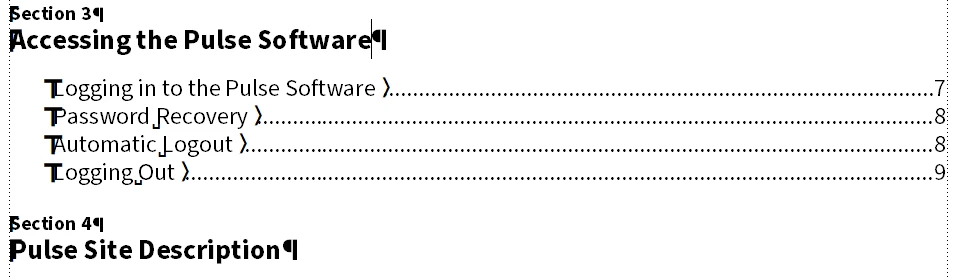
I have a chapter heading that is converting to PDF weirdly, but only for one file. The tags used for the headings are identical in both files. The tag used in the generated TOC is identical for both entries.


This is what it looks like in the generated TOC:
 

This is what it looks like after the PDF output is created. 
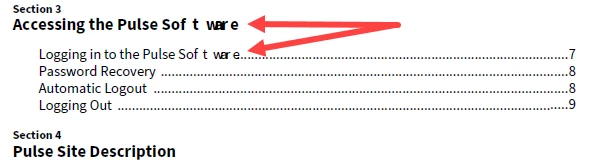
 

Why is the word Software so oddly spaced in both entries after conversion to PDF? It's only those two headings that convert so oddly. All the others are spaced correctly.

This topic has been closed for replies.
Correct answer pulkitn

The issue reported was occuring due to following facts :

  • "Asian Composer " was checked in for English content , FrameMaker expects this setting to be checked in case of CJK language only.
  • "Language " selected was Chinese for English content .


Issue will not occur once proper setting is followed  for english content .

Thanks 
Pulkit Nagpal
FM & FMS Engg.

12 replies

pulkitn
Adobe Employee
pulkitnCorrect answer
Adobe Employee
October 5, 2021

The issue reported was occuring due to following facts :

  • "Asian Composer " was checked in for English content , FrameMaker expects this setting to be checked in case of CJK language only.
  • "Language " selected was Chinese for English content .


Issue will not occur once proper setting is followed  for english content .

Thanks 
Pulkit Nagpal
FM & FMS Engg.

LinSims
Community Expert
LinSimsCommunity ExpertAuthor
Community Expert
September 28, 2020

And hopefully the last update until a fix is made: Pulkit Nagpal from the FrameMaker development team has been able to reproduce the error and there is now an internal ticket for it. Yay!

LinSims
Community Expert
LinSimsCommunity ExpertAuthor
Community Expert
June 16, 2021

If anyone wants to vote for this bug to be fixed, see: FRMAKER-9315.


My current workaround is to save as PDF but I have the Publish pod set to run it through Acrobat Distiller. So far (knock wood) this has generated PDFs with no weird spacing issues.

Matt-Tech Comm Tools
Community Expert
Community Expert
June 17, 2021

Lin, have you forced the offending font to download?

I see what you're experiencing when either:

  • Rely on System Fonts Only is selected (Best to DEselect this option)
  • The font is not Adobe (or other high quality source) and I've not forced the font to Always Embed

Try forcing Always Embed via the Fonts panel in the joboption. If not, choose a more standard Adobe font. 

-Matt

-Matt Sullivan, FrameMaker Course Creator, Author, Trainer, Consultant
LinSims
Community Expert
LinSimsCommunity ExpertAuthor
Community Expert
September 25, 2020

Same file, using Opens Sans instead of Source Sans Pro. Spacing is even more messed up:

I got similar if not worse results converting with the font set to Calibri, but when I converted with Arial, ta-dah! It worked fine.

Open Sans, Calibri, and Arial are all Windows fonts installed locally. 


Unfortunately for me, we can't use the Arial font. Open Sans is the corporate font, and Source Sans Pro is the closest we can come for our documents because it has the super/subscript glyphs we use when constructing fractions. Unless Adobe can figure out what is going on, it looks as if my coworker and I are going to be stuck using File > Print rather than the far faster Save as PDF.


(Why don't we use Publish? I don't know about my coworker, but I want the PDF saved where I want it, not where Adobe thinks it should go, so unless they let that be set as an option, it's not going to get used.)

LinSims
Community Expert
LinSimsCommunity ExpertAuthor
Community Expert
September 25, 2020

It's happened again. So it's not these files, it's either an issue with the PDF engine in FM2020 or with the font (Source Sans Pro, activated through Adobe Fonts). This did not happen with FM2019 and the same font, so I'm inclined to think that it is an issue with the PDF engine.

LinSims
Community Expert
LinSimsCommunity ExpertAuthor
Community Expert
September 14, 2020

The last test: replacing the Adobe activated fonts with locally installed ones produced the same weird spacing result using File > Publish > PDF output and File > Save As PDF. It produced perfect copy using File > Print.


I'd still like to know what the <expletive deleted> is going on, but not enough to spend more time on it. Our current document isn't likely to be historically important or need to be opened in 50 years, so what I've got is likely to do well enough. 


Does anyone think moving this to the Acrobat forum would be useful? It certainly seems to be an issue with creating PDF output.

LinSims
Community Expert
LinSimsCommunity ExpertAuthor
Community Expert
September 13, 2020

I normally use the Save as PDF flow. I tried Publish when that didn't work. I thought those settings applied to Save As PDF as well as to the File > Print flow. I used File > Print as a last resort.


These are the settings in the Publish pod. Other than selecting the custom joboptions file, I think they're pretty standard.

[Side note: At Zoom is still not reliable.]


Community Expert
September 14, 2020

Hi Lin,


When you activate the Use Acrobat Distiller option, you should get the same result as when you print to PDF.


You said that the text is a variable. Is there any formatting info in the variable? Do you get the same issue, when you copy the paragraph and enter the same text manually? Or just a portion of the text (without the tab and the page number)?

I had such an issue a few years ago, but I cannot remember what the issue was.


Best regards


Winfried

LinSims
Community Expert
LinSimsCommunity ExpertAuthor
Community Expert
September 14, 2020

Hi Winfried,


I did not activate the Use Adobe Distiller option in the Publish pd, nor did I print to a .ps file when I used File > Print Book. 


I think you may have missed some of the troubleshooting I did, so here it is, all in one spot:


  • Deleted the original TOC files and created new ones using a known good template file
  • Did a MIF wash of the entire book
  • Reinstalled Acrobat (that actually happens fairly often; I have constant issues with Fatal DDE errors)
  • Removed the user variable for the word Pulse in the source file and replaced it with text (not that the variable carries over to the TOC)
  • Removed the hard space between Pulse and Software in the source file (not that it carried over to the TOC)
  • Moved the Index marker from after the word Software to the text of the following paragraph
  • Deleted the entire title and subheading and retyped them by hand


There were no character tags applied to the two headings in the source file, nor did I add any to those lines in the TOC after the TOC file was generated. There is no character tag applied in the definition of the user variable, not even <Default font>. 


And, I might add, the last time I worked with this document this did NOT happen. I even looked at my archived copy to recheck and, yep, the phrase "Pulse Software" was properly spaced. If it weren't for the fact that it is only that phrase, and only those two lines in the TOC, that are being rendered incorrectly, I wouldn't be so frustrated. 


I'm considering deactivating the Adobe font and installing Source Sans Pro locally, instead. It's the only thing I haven't tried, and I think the last time I worked on this document, it had been installed locally. Of course, the last time I worked on this document was in FM2019 and ... whatever version of Acrobat DC was available then.


Platform specs, in case it makes a difference:

Windows 10 Pro, 10.0.1.18363, update 2004

Dell Latitude E7470, 16Gb RAM

FrameMaker 2020 16.0.0.754

Acrobat DC Pro (kept up to date via subscription)


Barb Binder
Community Expert
Community Expert
September 13, 2020

Hi Lin:


Those are screenshots from the File > Print workflow, which I though was working for you.


Wasn't the odd spacing on "Software" from using the new engine in the Publish pod?


~Barb 

~Barb at Rocky Mountain Training
LinSims
Community Expert
LinSimsCommunity ExpertAuthor
Community Expert
September 13, 2020

It's essentially the Standard joboptions, with a couple of tweaks on the General and Images settings (see the following screenshots).


We need the images to be as high resolution as possible when zoomed in, so they are no longer compressed or resampled at all after complaints that they were too grainy. We use Source Sans Pro as our font. Since that's activated through Adobe fonts it can't be embedded, so I deselect the Rely on system fonts only option, as I most definitely want the PDF created with the document fonts.


[Other things I did that weren't listed as part of the troubleshooting include replacing the user variable that inserted "Pulse" into the title with plain text, removing the hard space between "Pulse" and "Software", moving the Index marker that had been inserted after the word "Software" to the end of the text paragraph after it, and retyping the phrase "Pulse Software". All to no avail.]


I honestly don't think the settings are the issue. This same document has been created in the past, with the same font and the same settings, with no issues on the TOC.


Barb Binder
Community Expert
Community Expert
September 13, 2020

Hi Lin:


Which job option did you select in Publish Settings?


~Barb

~Barb at Rocky Mountain Training
Barb Binder
Community Expert
Community Expert
September 12, 2020

Hi Lin:


For your stated purposes, the Print to PDF should be fine. The PDF/A formats are meant for archiving—reducing risks to the future reproducibility of the content and ensuring that the files will look the same today as in the future. The PDF/X formats are geared to facilitating graphics exchange and contain commerical printing-related requirements.


~Barb 

~Barb at Rocky Mountain Training
LinSims
Community Expert
LinSimsCommunity ExpertAuthor
Community Expert
September 13, 2020

Good to know.


I'd still like to know why it happened in the first place, though. It's just weird.