
Participating Frequently
April 20, 2021
Question

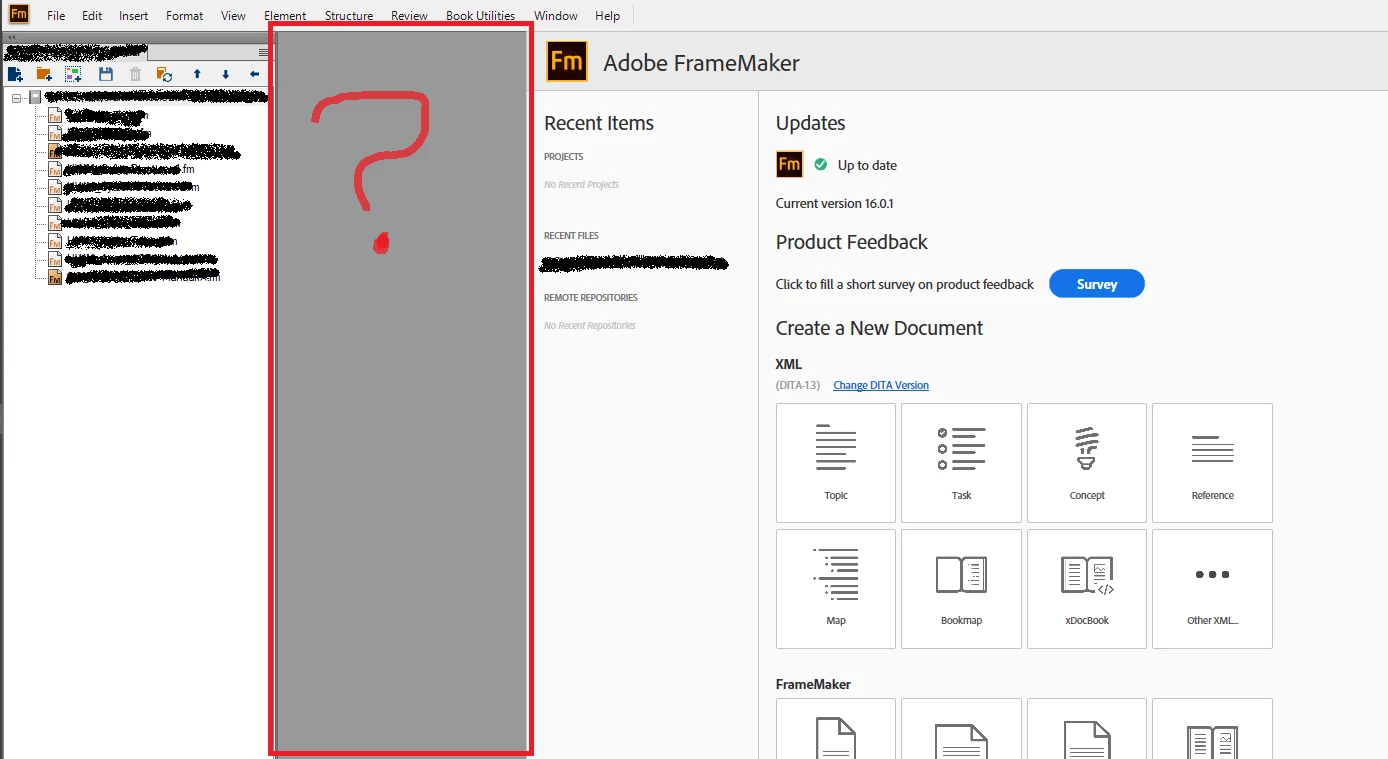
Welcome screen mystery panel

  • April 20, 2021
  • 2 replies
  • 437 views

Hi All,

I'm having a weird issue with my Welcome screen where it seems it's always shifted to the right (image below). If I open a document or a book and click on the Welcome screen, that mystery panel fills in with whatever is "behind" it. I have tried a few things to try and fix it, including removing FM and then reinstalling, but it always seems to find a way back. Is there button I've mashed or preference I've enabled? Has anyone seen this and can make it go away? Framemaker is still completely useable but knowing that mystery panel is there is distracting me, and I'm easily distracted. 😞

Thank you very much,

Megan
    This topic has been closed for replies.

    2 replies

    LinSims
    Community Expert
    Community Expert
    April 21, 2021

    Book Utilities is installed by the Book MIF Wash script that used to be a sample script. I think I put in a feature request that it be automatically installed instead of people having to figure out how to install it themselves, as it's very useful when you want to do  MIF wash, and I noticed that was happening with the 2020 release.

    Community Manager
    April 20, 2021

    "If I open a document or a book and click on the Welcome screen, that mystery panel fills in with whatever is "behind" it."

    Do I understand correctly, that this "mystery gap"  is not there when you open a book, but only shows up when you actually "click" into the Welcome Screen?


    Strange. I have never seen this. Maybe some plugin is causing this? I can see that you have a "Book Utilities" menu there which must come from a plugin. 


    Also, any other thing that might be special about your machine? Like, running Windows in a Virtual Machine on a Mac, some super fancy 8k Monitor, access through Terminal Server, … whatever might be somehow special?

    Oh, and: What happens when you resize the FrameMaker window? Does the mystery panel scale and become smaller or bigger or even dissapears?

    Megan5EAEAuthor
    Participating Frequently
    April 20, 2021

    Hi Stefan,

    Thanks for the quick reply! Answers below:

    • Machine is an HP Z-book attached to a Dell display (workplace special) connected via HDMI; runs Windows 10 enterprise and FM2020.
    • Not running any special or fancy that I'm aware of. Just the standard "corporate software suite" (Office, Teams, VPN and Slack). FM behaves this way whether I'm connected to VPN or not.
    • I haven't installed any plugins that I'm aware of. 
    • Resizing the window has zero effect on the panel. Panel is static and the rest of the Welcome screen adjusts as I resize the FM window.
    • Attached another image of what I mean by "fills up with whatever is behind it"; in this image, the Welcome screen shows some of the content of a file that was opened then closed. The mystery panel doesn't always "empty out" after closing a file.


    I'm glad to see I haven't posted something that's been seen 20 times already!

    Community Manager
    April 20, 2021

    Thanks a lot. That last screenshot might have been helpful … If my hunch is right. Can you check with IT on the specific model of your ZBook and the graphic card it has? And check with them if the graphic card driver is up to date? I have seen this specific "Document Ghost" effect some time ago and have blurry memories that it was solved with an update of the graphic card driver.

    If that does not solve it, please send an email to tcssup@adobe.com with me on CC (my last name + @17309390.) as I guess in that case we will not be able to solve this through this forum.