



Barb Binder
Community Expert
Community Expert
Nov 18, 2021 3:26 PM UTC
Answered

What is the tab character in REGEX?

Hello FrameMaker friends:


I'm trying to find/change a series of spaces to tabs. The problem space always follows an R and four digits. For example,

R0000 followed by a space needs to be R0000 followed by a tab


So, this
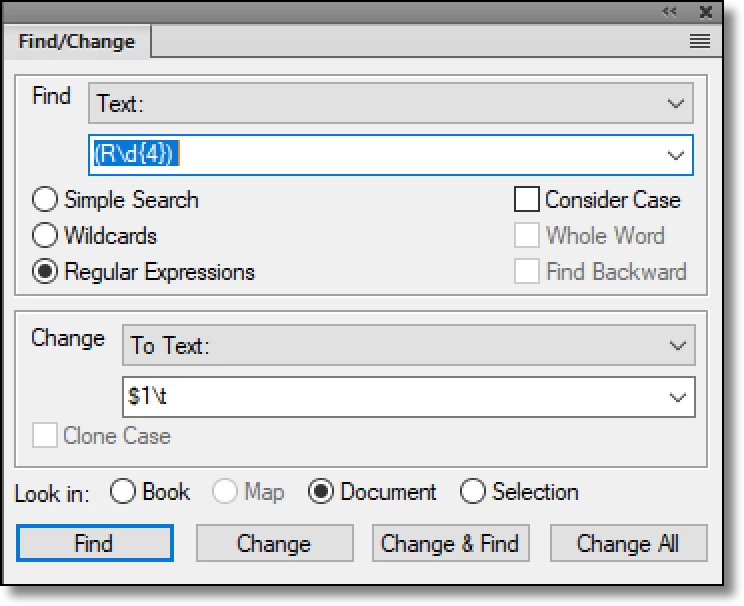
locates the string but adds back in as R0000t and not R0000>.


Looking it up, \t is the REGEX character for a tab. What am I missing?


TIA,

~Barb

    This topic is closed to new replies. Start a new post to keep the conversation going.
    frameexpert
    frameexpertCorrect answer
    Community Expert
    Nov 18, 2021 3:35 PM UTC

    Barb, try this for your tab: \x08

    www.frameexpert.com

    6 replies

    Barb Binder
    Community Expert
    Community Expert
    Nov 19, 2021 3:51 PM UTC

    Thanks, all! 😊

    Translate
    ~Barb at Rocky Mountain Training
    K.Daube
    Community Expert
    Community Expert
    Nov 19, 2021 9:45 AM UTC

    This is a very old problem, because FM uses x08 as TAB character, whereas the ANSI definition is x09.

    It may well be that \t is implemented as x09...

    At least in ExtendScript RegEx \t handles the TAB character of FM correctly.

    My tests in 15.0.8.979 (aka 2019) show this:

    • \t is found in text by Simple Search, Wildcards and Regular expression
    • \t is not honoured in the replacement of the RegEx  Search which is IMHO a bug

    Tests in 16.0.3.979 (aka 2020) show this:

    • \t is found in text by Simple Search, Wildcards and Regular expression
    • \t is not honoured in the replacement . It is even worse: finding Question and replacing this with $1\t yields the single character t !!! I have reported this as bug 11044

    Edit

    From the reported bug only the part concerning handling of the TAB (\t) is correct.

    Ah, I really become old: $1 requires that the find expression contains at least one group ...

    Translate
    Community Expert
    Nov 19, 2021 8:41 AM UTC

    Hi Barb,


    You can also copy a tab from your document and paste it into the Change field.

    Then FrameMaker will replace with a tab correctly.


    Best regards


    Winfried

    Translate
    Legend
    Nov 18, 2021 3:46 PM UTC

    Might be a bug.

    This works: $1\u0008

    Translate
    Barb Binder
    Community Expert
    Community Expert
    Nov 18, 2021 3:45 PM UTC

    Thank you, Rick! 😊


    ~Barb

    Translate
    ~Barb at Rocky Mountain Training
    frameexpert
    Community Expert
    frameexpertCommunity ExpertCorrect answer
    Community Expert
    Nov 18, 2021 3:35 PM UTC

    Barb, try this for your tab: \x08

    Translate
    www.frameexpert.com