Ahsan,
You mentioned on another thread that you are using a conversion table. Here, you refer to applying structure to your document. Do you mean by importing element definitions from the EDD into your document? If so, you need to get the document to match the element structure defined in your EDD. For this to happen, you may need to modify the EDD, the conversion table, or the preliminary structured document produced by structuring the unstructured document using the conversion table. How did you create your conversion table? How did you create the EDD?
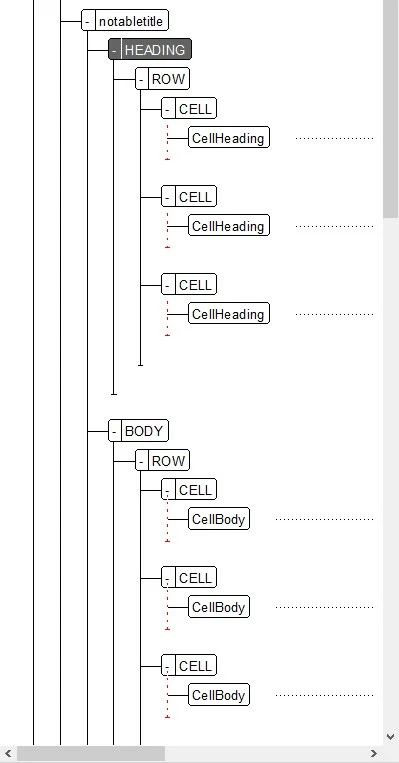
The particular error indicated by the Structure View you've provided indicates that the CELL elements are incorrect because they contain CellBody elements which are not permitted in a CELL (or at least not permitted at the start of a CELL) by the current element definitions, presumably those specified in the EDD. You can fix the error in any one of the following ways:
- Changing the conversion table to put text into CELL elements and not generate CellBody elements.
- Changing the EDD to expect CellBody elements within CELL elements.
- Changing the structured document by unwrapping the CellBody elements (this method requires more work than either of the other two).
If your unstructured document contains a table tagged notabletitle whose cells contain paragraphs tagged CellBody and you ask FrameMaker to construct a new conversion table from that unstructured document, the generated conversion table will contain the following rows:
Wrap this object or objects | In this element | With this qualifier |
P:CellBody | CellBody | |
T:notabletitle | notabletitle | |
TC: | CELL | |
If you do not want to use CellBody elements, do the following:
- Delete the p:CellBody row, and
- Change the contents of the first cell in the last row from "TC:" to "TC:P:CellBody". The former says to make any table cell (TC:) a CELL element. The latter says to make a table cell containing a paragraph tagged CellBody to be a CELL.
You may also want to make analogous changes to the definitions of heading cells and the paragraphs they contain.
By the way, you may be able to use the same element for all tables, whether or not they have titles. To do so change "T:notabletitle" to "T:" and change "notable" in the next cell to something generic such as "tabletitle".
If you decide you'd like to keep the CellBody element, change the general rule for "CELL" in your EDD to "CellBody".
Every structured document contains element definitions. The various methods of creating element definitions include importing them from an EDD, using a conversion table to structure an unstructured document, and importing an XML document. When you apply a conversion table using the P:CellBody and TC: rows shown in the above table fragment, FrameMaker defines CELL with the general rule "<TEXT>". Thus, even though it builds a structured document in with the CELL elements contain CellBody elements, the CELL elements are invalid because it defines CELL to contain text rather than CELL elements.
In many projects, the default definition of CELL must be modified in an EDD, as discussed here, to remove the intermediate CellBody element, but also to allow for multiple paragraphs in one table cell, or to allow additional elements such as lists, graphics, or subscripts and superscripts.
--Lynne




 AdChoices