

Inspiring
July 3, 2026
Question

what regular expression

  • July 3, 2026
  • 3 replies
  • 78 views

Hello,

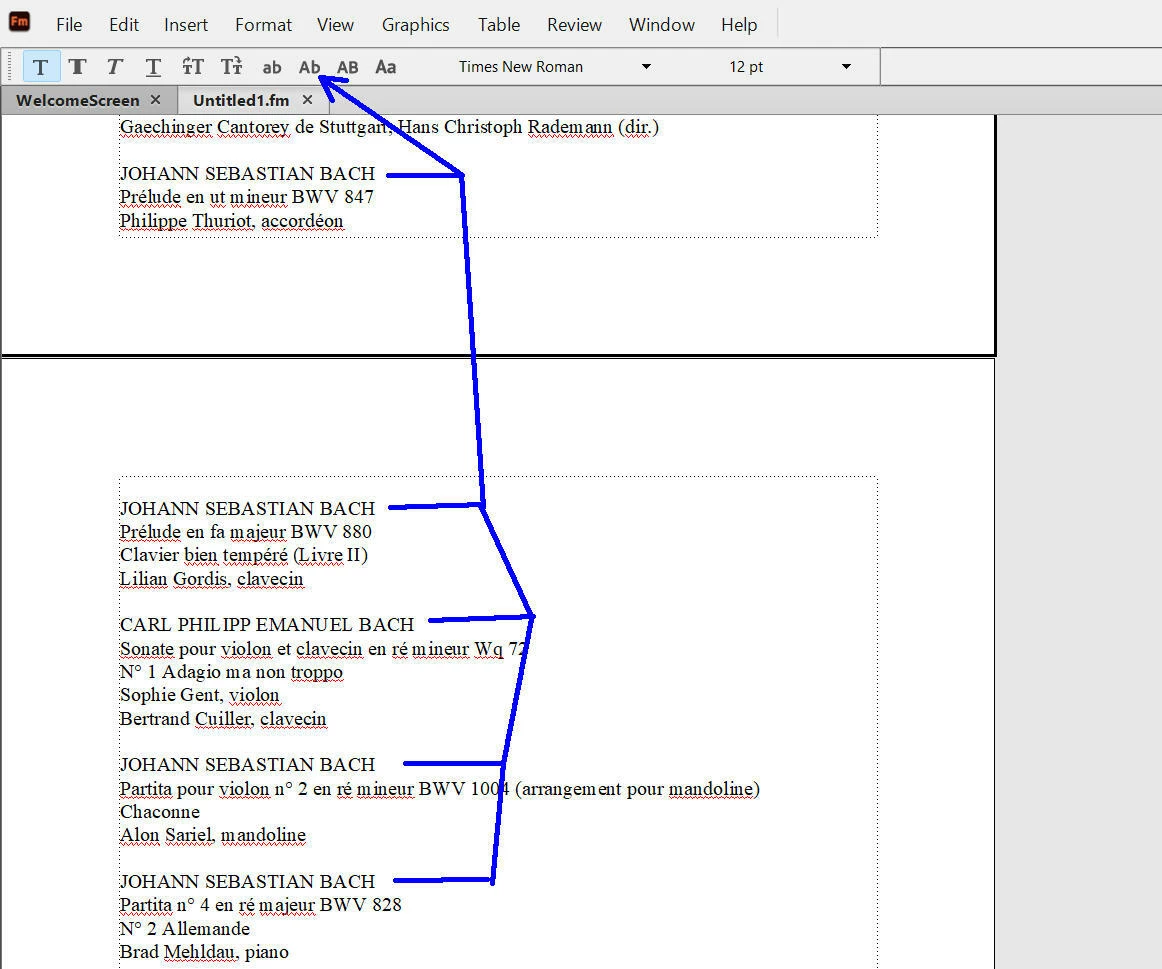
I would like to use a regular expression that could change the “capital letters” to “capital letter + initial” (see blue arrow). What do you advise me to use as a regular expression in that case ?



    3 replies

    Barb Binder
    Community Expert
    Community Expert
    July 10, 2026

    Hi Pierre:

    REGEX does have an option to change case, but FrameMaker doesn’t support it (yet). It would make a great feature request.

    Here’s an expression that works in InDesign (and in the free text editor Notepad++) but FrameMaker doesn’t understand the \L to designate lowercase. This is an InDesign recording.

    Find: 

    \b([A-Z]?)(\w+)

    Change:

    $1\L$2


    Frustrating, but here we are. It does look to me like you are still setting up so if the text isn’t in FrameMaker yet you could download the free Notepad++ and run the REGEX shown above or even fix it in Word.

         Word doesn’t support REGEX but it supports wildcards and it could be handled as shown below prior to importing the text into FrameMaker:

    • Ctrl+H to open Find & Replace
    • Click the Find Tab
    • Find (all words with at least two consecutive uppercase letters):
    • [A-Z]{2,}
    • Wildcards enabled
    • Find in Document (highlights all upper case text)
    • Close Find & Replace dialog box (words remain highlighted)
    • Click the Change Case button on the Home Ribbon and choose Capitalize Each Word


    ~Barb

    ~Barb at Rocky Mountain Training
    Inspiring
    July 11, 2026

    @Barb Binder 

    Hi Barb,

    You have said : “Word doesn’t support REGEX but it supports wildcards”.

    But Framemaker support also “wildcard”. But I suppose I cannot do it also with FM wildcard ?

    If I open a feature request in FM, what exactly to ask ?

    Barb Binder
    Community Expert
    Community Expert
    July 11, 2026

    Hi Pierre:

    Yes, FrameMaker does support wildcards but no, we can’t automatically change the case directly in FrameMaker without a script.

         I would handle it using a method I showed yesterday prior to import but as I continued thinking about the Word workflow and FrameMaker’s new Find All panel, this follows the same logic and would work in FrameMaker but clearly is not automatic. 


         No support for REGEX \L and \U (convert to lowercase and uppercase) in the change field is what is limiting the case conversion in FrameMaker. That's what I’d ask for and add a link to this thread to further explain. However, I went to get the link for Tracker for you: https://tracker.adobe.com/#/home but when I tested it, I see that I am signed in but all of my data is missing.

    Maybe Adobe is migrating this to a new location but it’s the first I’ve heard of it. I’ll reach out to ask, but in the meantime, perhaps someone else already knows what’s going on? ​Maybe @Stefan Gentz?

    ~Barb at Rocky Mountain Training
    frameexpert
    Community Expert
    Community Expert
    July 3, 2026

    This can’t be done with just a regular expression. You would need an ExtendScript script to do this.

    www.frameexpert.com
    Jeff_Coatsworth
    Community Expert
    Community Expert
    July 3, 2026

    Have you figured out what the OP is looking to do? I’m still unsure what exactly they want the result to look like...

    frameexpert
    Community Expert
    Community Expert
    July 3, 2026

    I am assuming he is looking for an automated way to change the all-caps paragraphs to initial-caps.

    www.frameexpert.com
    Jeff_Coatsworth
    Community Expert
    Community Expert
    July 3, 2026

    Your blue arrow is pointing to initial caps - so all your uppercase JOHANN SEBASTIAN BACH would change to Johann Sebastian Bach - is that what you’re asking to do? If so, you don’t need a regular expression to accomplish that.