
Known Participant
April 14, 2021
Question

What's changed in FM2020 to its Responsive HTML5 publish?

  • April 14, 2021
  • 7 replies
  • 581 views

Hi,
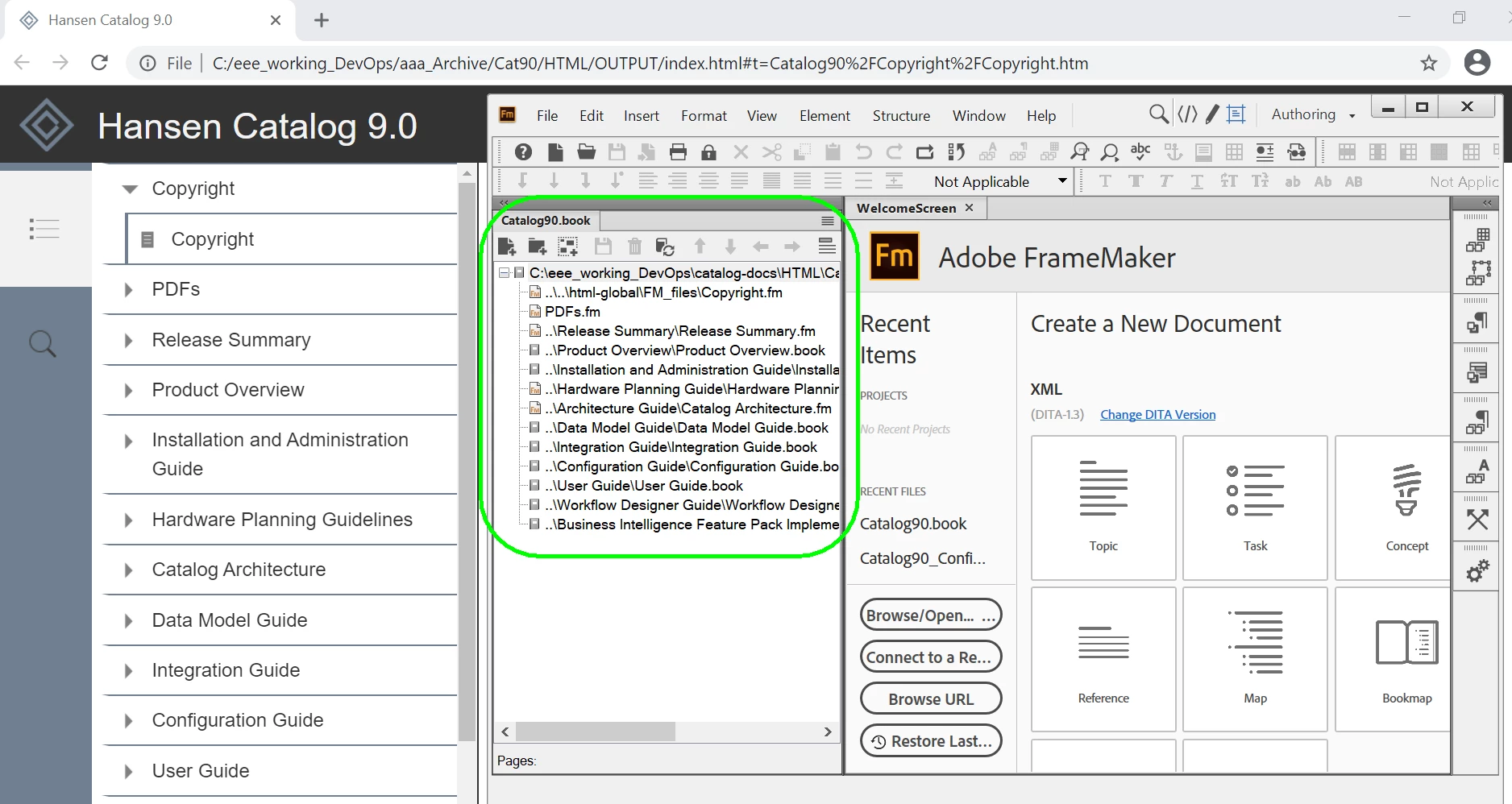
In FM2019 we use book files to create HTML5 output that provides links in the left-hand navigation for each guide that's in the product's documentation set (plus copyright and PDF access). You can see that for each file or book in the book file, there's a corresponding link to the product guide in the left-hand navigation:
 

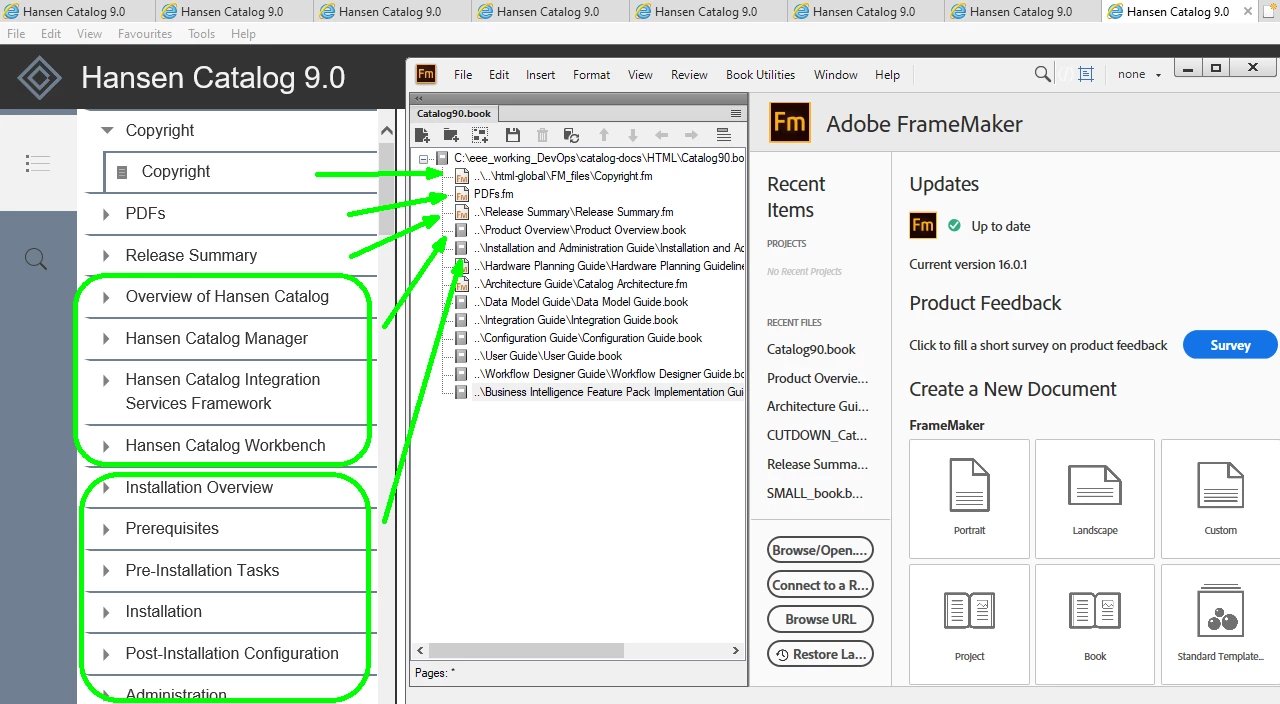
In the trial version of FM2020, this same book file generates output that does not have the name of the product guide in the left-hand navigation, instead all its files are being shown.:
 

In trying to get to the bottom of the problem, I have found out these things:

  • If I use the FM2020 default.sts I get the same 'wrong' output
  • If I create a fresh new book file and add in just one book, publish HTML5 causes "Adobe FrameMaker 2020 stopped working" error
  • Changing the 'book-of-books' book file to have fewer book in it (excluding them or deleting them) then using publish HTML5 causes the "Adobe FrameMaker 2020 stopped working" error
  • I can't successfully create alternative book files to test because using publish HTML5 causes the "Adobe FrameMaker 2020 stopped working" error


I am still currently in the trial period for FM2020. Could this be causing the problem? Is the trial version not the complete version of FM2020?


Has anyone else faced these issues:

  • HTML5 output different between FM2019 and 2020?
  • Attempts to test/debug/solve the publishing HTML5 issue causes FM2020 to stop working?


Thanks!

    This topic has been closed for replies.

    7 replies

    Known Participant
    May 10, 2021

    Further update from Adobe Support:


    • ToC differences between FM2019 and FM2020
      • As indicated in my last reply, this is now the subject of https://tracker.adobe.com/#/view/FRMAKER-9922 
        It is being worked on by the product team, although an ETA for its appearance in a future release is not yet available.

    • Crashing on Publishing in FM2020
      • Adobe Support analysis: This only happens when the first component of the book-of-book files is a child book.
        • I can confirm this is correct, so we can avoid this problem from now on.
    Known Participant
    April 21, 2021

    Many thanks to Adobe Support who have been helpful and I now know the following:

    FM2020 is designed not to provide sub-book names in book-in-book ToCs.
    I was told to raise a Request Feature, so I have and its link is here.
    Please vote, if this is an issue that's affecting you too.
    The publish "Adobe FrameMaker 2020 stopped working" error that caused FM2020 to crash was diagnosed by Adobe Support as a bug and is now the subject of FRMAKER-9920


    Happy voting.

    Known Participant
    April 16, 2021

    Hello Pulkit,

    Thanks for your email.

    I have just come off a Support call with Shivang Chaudray.

    He suggested I forward you this set of files to diagnose.

    Product Overview is the name of one guide and FM2020 can publish this as a standalone guide.
    SMALL_book.book points to the one single Product Overview book file (you may have to change the path).
    I haven't included the graphics files.
    This has not built successfully.

    Shivang used a remote session to log in to my laptop and try running as an administrator. This did not seem to make a difference.

    If the FM2020 behavior is now "TOC of sub-book will be directly inserted inside Main-book w/o giving the name of the Sub-Books" this is not a good user experience for me!
    How do I recreate the output that I used to achieve in FM2019?

    I hope you can solve these issues for me.

    Thanks,
    Nicola
    [PII removed by moderator]

    Almtuna
    Inspiring
    April 16, 2021

    No answer, just a comment:

    I uninstalled FM2020 and went back to FM2019 when I run into this HML5 problem. (Not running trial version.)


    pulkitn
    Adobe Employee
    Adobe Employee
    April 16, 2021

    Hey @defaultmdgbu8fseg0r ,

    I had discussed TOC behavior internally with my colleague and it is the desired behavior in FM2020 where  TOC of Sub-Book will be directly inserted inside Main-Book w/o giving the name of Sub-Books,

    Further, Your issue related to FM2020 stopped working :

    • Was it random or occurring every time?
    • Would you mind sending me a sample file set where we can re-create and solve it?


    Thanks
    Pulkit 

    Robert_^_W
    Inspiring
    April 16, 2021

    I don't have any answers for you, but you are not alone with version 2019>2020 issues with HTML 5. We've found the look of the sections is different, the topics are separating where they weren't asked to, and our context markers aren't translating correctly.

    Jeff_Coatsworth
    Community Expert
    Community Expert
    April 14, 2021

    Make sure you're running the most updated version of FM2020 - check Help > Updates to see if there are newer updates to be applied.