

K.Daube
Community Expert
Community Expert
June 24, 2019
Answered

What's wrong with my book window?

  • June 24, 2019
  • 1 reply
  • 489 views

FM 15.0.3.603: Suddenly last week the book window shows very tiny script
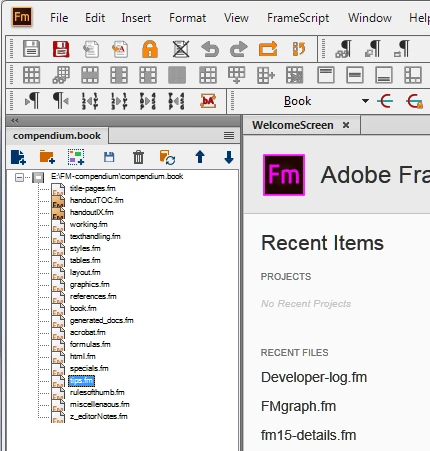
I thought that this is quirk of the specific book file, but unfortunately it is not. Opening any of my existing book files I see this small font. How can I get the ordinary font size back?

    This topic has been closed for replies.
    Correct answer Winfried Reng

    Hi Klaus,

    You can change the font size of the file names in your book window.

    In the View menu click Zoom and select one of the items.

    This question came up recently. Check Barb's answer here:

    https://forums.adobe.com/message/11104604#11104604

    Best regards

    Winfried

    1 reply

    Winfried RengCommunity ExpertCorrect answer
    Community Expert
    June 24, 2019

    Hi Klaus,

    You can change the font size of the file names in your book window.

    In the View menu click Zoom and select one of the items.

    This question came up recently. Check Barb's answer here:

    https://forums.adobe.com/message/11104604#11104604

    Best regards

    Winfried

    K.Daube
    Community Expert
    K.DaubeCommunity ExpertAuthor
    Community Expert
    June 24, 2019

    I never realised that the ZOOM function also acts on the book window...

    • Focus in book window
    • Using the + and - button bottom right of the app window changes the size of the font

    Was this function there also in older FM's?

    Have tested: it was introduced with FM-14 aka 2017.

    Barb Binder
    Community Expert
    Community Expert
    June 24, 2019

    Hi K.Daube:

    I don't know when it was introduced. I discovered it by accident when my cursor was in the book window when I wanted to zoom in on the document. I found it after the interface change (v9), but don't recall which version it was, just that it was years ago.

    ~Barb

    ~Barb at Rocky Mountain Training