


Participating Frequently
May 16, 2016
Answered

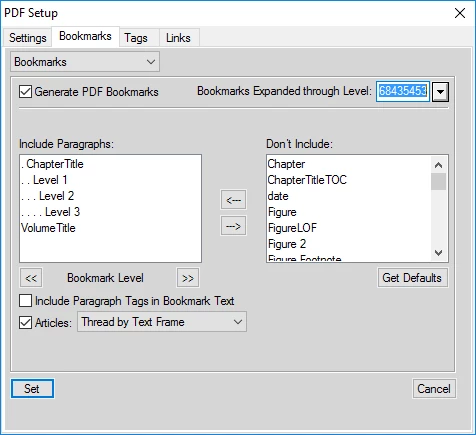
When I print a framemaker document to pdf the option in pdf Setup > Bookmarks > Bookmarks expanded through level will not allow me to select "none"

  • May 16, 2016
  • 9 replies
  • 1040 views

When I print a framemaker document to pdf the option in pdf Setup > Bookmarks > Bookmarks expanded through level will not allow me to select "none" or "default" etc. I can only select the number that is showing.
    This topic has been closed for replies.
    Correct answer Arnis Gubins

    This dialogue entry also allows you to directly enter a value. So type 1, 2 or 3 as required.

    9 replies

    Legend
    December 17, 2017

    Thanks for reporting this. We can reproduce it and it is already filed under ticket FRMAKER-2396. We will look into a fix for a future update.

    Arnis Gubins
    Arnis GubinsCorrect answer
    Inspiring
    May 16, 2016

    This dialogue entry also allows you to directly enter a value. So type 1, 2 or 3 as required.

    kevin9432Author
    Participating Frequently
    May 19, 2016

    Typing in None or 1, 2, or 3 worked. I just find it strange that you cannot select from the drop down menu.

    Thanks for the help and answer.

    Arnis Gubins
    Inspiring
    May 19, 2016

    There are a number of drop-down lists in FM where you can also manually enter any value instead of selecting what is shown in the list. Unfortuntely, there are no visual cues that you can actually do so. Just plain bad GUI design...