


Inspiring
April 6, 2018
Answered

When saving as .pdf, "Include Paragraghs"

  • April 6, 2018
  • 4 replies
  • 441 views

Hello,

I've set these, but did not include "Title".  But the setting seems to revert back in between saves...  Furthermore, is there some reason to use one or the other?  I find the font is at least different.
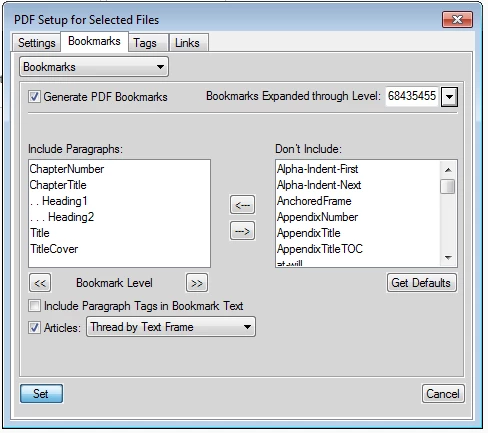
Thanks in advance

Regards,

Ben

    This topic has been closed for replies.
    Correct answer Stefan Gentz

    Hi Ben,

    there are two levels where you can define which paragraphs go into the PDF bookmarks:

    • The individual document
    • The book

    The setting on book level overrides the document setting. Please try the following: Open the book file, select all files in the book and select > Format > Document > PDF Setup... from FrameMaker's main menu. Set the paragraphs to "Include Paragraphs" / "Don't Include" as needed, click "Set".

    This sets the bookmarks for all files in the book in the same way and should remove any "overrides" on book component level.

    4 replies

    Barb Binder
    Community Expert
    Community Expert
    April 7, 2018

    Morning, Ben.

    I confess to not understanding your question. The "Include Paragraphs" list tells FrameMaker what to pull for the TOC—are you (and Lothar) saying that FrameMaker won't pull in paragraphs tagged as Title into the TOC? Is Title used just on the cover page, and ChapterTitles in the body of the book? Where does saving as a PDF come in?

    ~Barb

    ~Barb at Rocky Mountain Training
    Inspiring
    April 9, 2018

    Hi Barb,

    To clarify.

    I am working on an existing book - making some slight changes (replacing a text value throughout).  I need to save as .pdf and when doing so, the Included Paragraphs has a paragraph whose tagged with "Title" and I am not sure why (TitleCover is assigned within the document to the TOC title ("Contents").  Not knowing why the "Title" paragraph is included, I moved it to the "Don't Include" list, save the document and all is well.  Then when I go to save the document again (as .pdf) the "Title" paragraph magically re-appears.  Is there some reason for this?  When I do a find in the book, the results point to the "Contents" paragraph, yet when I look at the tag assignment for this paragraph, it shows "TitleCover"

    regards,


    Ben

    Stefan GentzCorrect answer
    Legend
    April 9, 2018

    Hi Ben,

    there are two levels where you can define which paragraphs go into the PDF bookmarks:

    • The individual document
    • The book

    The setting on book level overrides the document setting. Please try the following: Open the book file, select all files in the book and select > Format > Document > PDF Setup... from FrameMaker's main menu. Set the paragraphs to "Include Paragraphs" / "Don't Include" as needed, click "Set".

    This sets the bookmarks for all files in the book in the same way and should remove any "overrides" on book component level.

    April 7, 2018

    Using one of my own books, I could reproduce the "Title" behavior - once, but not twice!