Participant
November 3, 2011
Answered

White boxes

  • November 3, 2011
  • 4 replies
  • 801 views

Our company still uses FrameMaker 5.5.  I'm having an art issue.  We put color in the background (on the master page).  All art that is linked in the flow of the book has a white box around it.  All of the art is Illustrator lineart saved as an eps.  Is there a way to get rid of the white box that comes in as the same height and width as the art? 

Ex - So if you have a 1' blue circle when it is imported in FrameMaker it shows up as a 1' square with a blue circle in it.
    This topic has been closed for replies.
    Correct answer Arnis Gubins

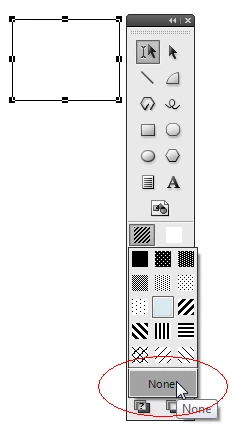
    It's not the colour, but rather the amount of Fill that you need to specify. Apply the FIll (of None) to all imported graphics and their repsective containers.

    4 replies

    jamr1975Author
    Participant
    November 3, 2011

    THANK YOU!!! I had done that to the anchored frame, but not the graphic inside the frame.  It still has a white box in FrameMaker but does pdf correctly.

    jamr1975Author
    Participant
    November 3, 2011

    When I click on the anchored frame and go to Object Properties, here's what I see. Should something be different?

    Color - None

    Tint - 100%

    Overprint - From Color

    Angle - 0

    Border Width - 1 pt

    Arnis Gubins
    Inspiring
    November 3, 2011

    Echoing Error's comments, make certain that all imported graphics, as well as their respective containers (Anchored Frames, Graphic Frames), have their fills set to None. By default, FM has an object's fill set to White.

    jamr1975Author
    Participant
    November 3, 2011

    Art is vector art.

    There wasn't a color choice of none, so I added it in FrameMaker but that didn't make a difference either.

    Arnis Gubins
    Arnis GubinsCorrect answer
    Inspiring
    November 3, 2011

    It's not the colour, but rather the amount of Fill that you need to specify. Apply the FIll (of None) to all imported graphics and their repsective containers.

    Bob_Niland
    Community Expert
    Community Expert
    November 3, 2011

    Can't test with 5.5, don't see this problem in 7.1.

    Are you seeing the problem in print or in final PDF?

    Preview images of imports, while editing, are commonly opaque rectangles.

    Are the anchoring frames set to fill none, pen none?

    If the imported content is raster EPS, does it have a clipping path around the perimeter of the object? If so, be sure to select the object in Frame, and set pen none.

    Vector EPS is usually transparent automatically.