

Community Expert
March 1, 2023
Answered

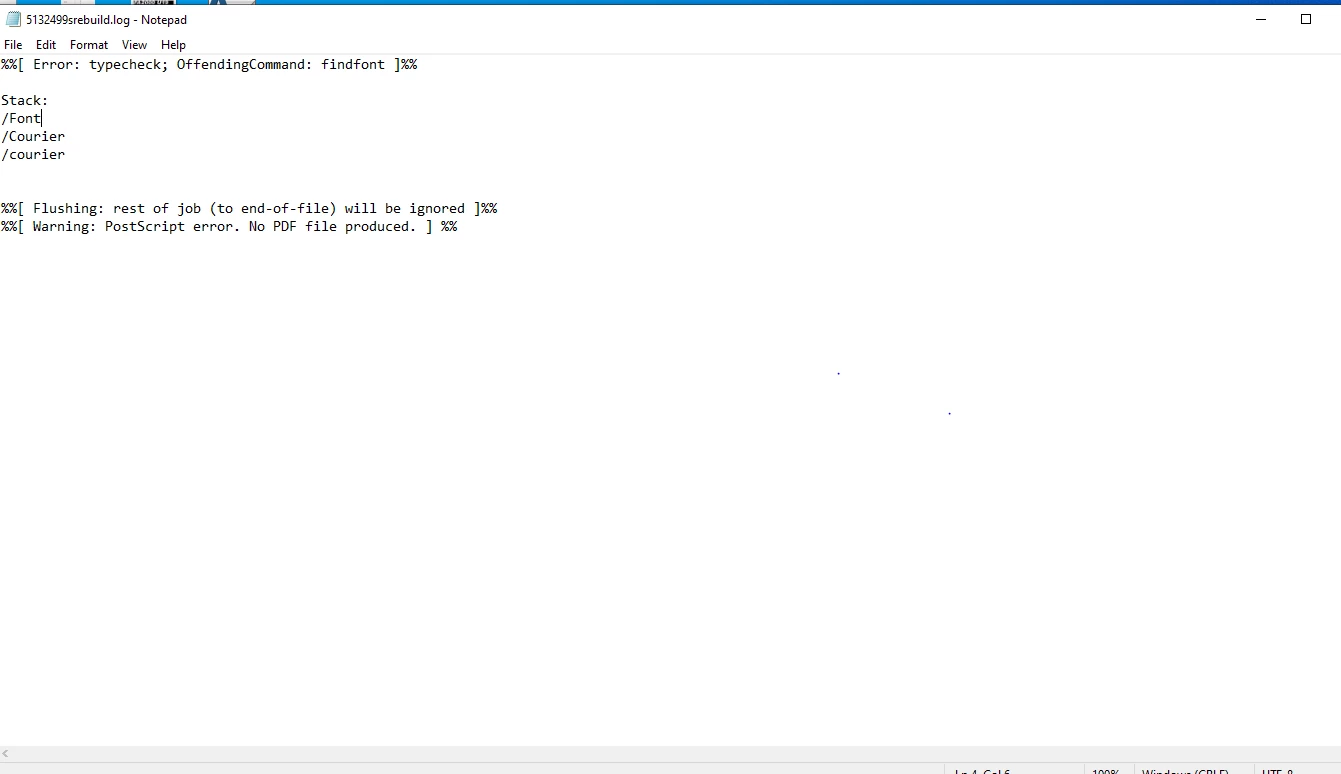
Why do I get the courier postscript error?

  • March 1, 2023
  • 3 replies
  • 1735 views

I have a client who has an enormous amount of documentation in FM2022. Recently we have started getting this error message when we try to print a book. When we do a "Save as PDF" and have Distiller on, things seem to work better, but not always. When we print to Adobe PDF FM invariably quits the process with this message.

  • I have tried supplying every thinkable version of Courier - makes no change.
  • I have tried making a folder with Courier fonts and haves set them to always embed in Distiller - makes no change.
  • I have tried different variations in PDF settings with rely on systems fonts or not - makes no change.
  • I have looked into the maker.ini - and I suspect this is where the culprit is, but I can't figure out what to change. It looks ok regarding the renaming of Courier. But then again - I may be wrong.

Does anybody here have a suggestion as to where to look?..

-Bjørn
    This topic has been closed for replies.
    Correct answer FrameMaker-dk

    So.. I found a rather unexpected explanation as to the Courier Postscript problem here:

    https://www.ptc.com/en/support/article/CS295228

    My client is also running Arbortext on his computer and Arbortext has just made it impossible to print to postscript on the computer. Just like that. I un-installed Arbortext and could once again print to postscript. Rather odd PTC hasn't fixed that issue.


    3 replies

    FrameMaker-dkCommunity ExpertAuthorCorrect answer
    Community Expert
    March 10, 2023

    So.. I found a rather unexpected explanation as to the Courier Postscript problem here:

    https://www.ptc.com/en/support/article/CS295228

    My client is also running Arbortext on his computer and Arbortext has just made it impossible to print to postscript on the computer. Just like that. I un-installed Arbortext and could once again print to postscript. Rather odd PTC hasn't fixed that issue.


    Bjørn Smalbro - FrameMaker.dk
    Community Expert
    March 10, 2023

    @FrameMaker-dk 

    Thank you for the information.

    What a ...

    Regards

    Stephan

    Bob_Niland
    Community Expert
    Community Expert
    March 1, 2023

    Courier was a Type1 font. Adobe is in a period of de-supporting T1 fonts. How that presents in various new versions of apps is not clear to me. What most people are using today would be Courier New. My current machine has Courier New, but no longer Courier. I have the .pfm & .pfb files for an instance of Courier, but see no case for installing it.


    Many legacy installations of Courier will further have a font that only populates the Code Page 1252 or ISO 8859 characters (the 00h-FFh range). What sort of error is thrown if someone attempts to apply Courier to some higher {Unicode code point} character is also something I don't have a solid guess on. Lacking font fallback, I might expect FM to just display a ? if you try, rather than kick the can down the road to Save-As output.

    Community Expert
    March 8, 2023

    @Bob_Niland I followed your line of thinking and found this article

    https://www.hollandlitho.com/disturbing_implications_postscript_fonts_discontinued.html

    I wonder... might these problems arise from eps files with embedded Type 1 Courier fonts?

    The client has a lot of really old eps graphics and I would find it plausible that some of them relied on Type 1 fonts.

    I am no expert in the workings of maker.ini. Might it be possible to edit the maker.ini and have it skip or substitute old ps fonts with newer otf fonts?


    Bjørn Smalbro - FrameMaker.dk
    Bob_Niland
    Community Expert
    Community Expert
    March 9, 2023

    Thanks for the link StudioSm.

    If Adobe has announced an FM timeline for T1 disco, it's not in that copy of the announcement, nor do I recall seeing one elsewhere. But because FM relies on a headless Acrobat (or used to), that could be the source of a problem. Printing to .ps and Distilling will definitely need the Distiller path.

    But when FM itself does pull the T1 plug, it would be valuable for Adobe or the community to suggest font fallback tweaks for maker.ini.

    Back on your font-embed-in-EPS theory, yes that could be looming, if not already an issue. Because PDF and SVG can also encode text by font invocation, imports of those could also break at some point, if not already. Imports aren't just a problem for FM. I'd expect the same issue in ID. Many shops may be about to learn that they cannot find, or never had, the sources for a number of imported objects bearing T1 gifts.

    Community Expert
    March 1, 2023

    Hi Bjørn,


    Is Distiller set to stop, when it cannot find a font?

    Fonts can also be in vector graphics. Had you checked this as well?

    When you get Distiller to create a PDF, you can search for all fonts with courier.


    Best regards


    Winfried

    Community Expert
    March 1, 2023

    hmm... those were good suggestions... how do I make Distiller stop when it cannot find a font? Or search for a font?


    I am not really sure this is a missing font issue though. The client has gotten himself a new pc and we have copied the entire font collection over on the new pc. The old install worked ok, but something is off on the new one...

    Bjørn Smalbro - FrameMaker.dk
    Community Expert
    March 1, 2023

    In the Adobe PDF settings in the Fonts section there is an option what to do, when embedding fails. The default setting is to warn and continue. However, you can also set this to cancel the job.