Inspiring
December 15, 2022
Answered

Why does the FM page show up twice?
  • December 15, 2022
  • 2 replies
  • 2779 views

    This topic has been closed for replies.
    Correct answer Barb Binder

    Hi @Ken27394707dkz1:


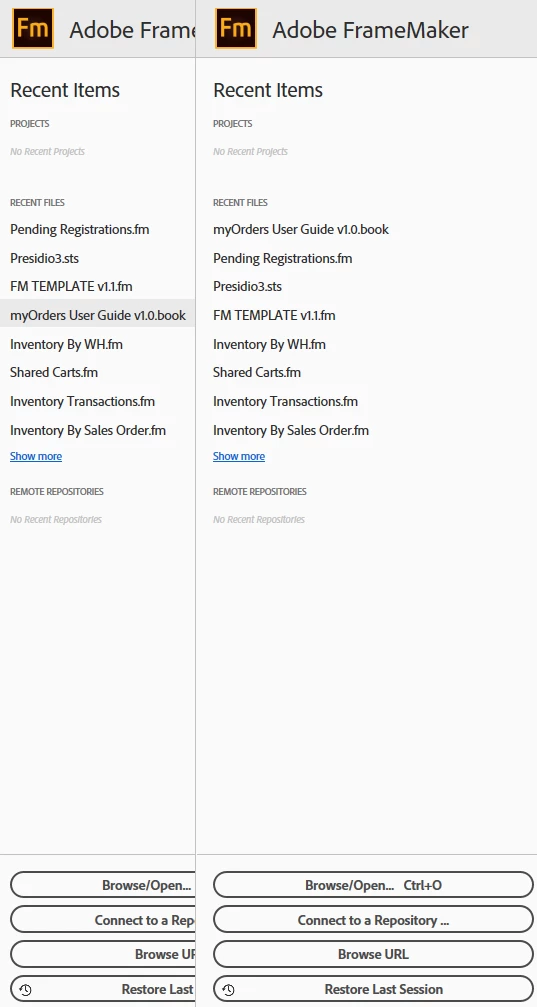
    That looks like a double Welcome screen, but with the closely cropped screen shot I can't tell if you have two instances of FrameMaker open (easy mistake to make) or if the Welcome screen is misbehaving. I would first look to see if you happen to have two instances of FrameMaker open at the same time. I wish FrameMaker would not do that, but it does.


    Restarting is great advice,  but if that isn't it, next up would be to rebuild the preferences to see if that works. You can read this to see how to do it, substituting in your version number. 

    https://www.rockymountaintraining.com/adobe-framemaker-resetting-preferences/


    For the first time, I saw a similar misbehaving welcome screen in class yesterday. The student was on FrameMaker 2019 and the welcome screen appeared like your right-most welcome screen, with her FrameMaker book window visible where your left welcome screen is. When I asked the student what was going on she said "it's not really there". And I just didn't have time to pursue that because we had a lot to get done and it did disappear once we started working. 


    ~Barb

    2 replies

    Barb Binder
    Community Expert
    Barb BinderCommunity ExpertCorrect answer
    Community Expert
    December 16, 2022

    Hi @Ken27394707dkz1:


    That looks like a double Welcome screen, but with the closely cropped screen shot I can't tell if you have two instances of FrameMaker open (easy mistake to make) or if the Welcome screen is misbehaving. I would first look to see if you happen to have two instances of FrameMaker open at the same time. I wish FrameMaker would not do that, but it does.


    Restarting is great advice,  but if that isn't it, next up would be to rebuild the preferences to see if that works. You can read this to see how to do it, substituting in your version number. 

    https://www.rockymountaintraining.com/adobe-framemaker-resetting-preferences/


    For the first time, I saw a similar misbehaving welcome screen in class yesterday. The student was on FrameMaker 2019 and the welcome screen appeared like your right-most welcome screen, with her FrameMaker book window visible where your left welcome screen is. When I asked the student what was going on she said "it's not really there". And I just didn't have time to pursue that because we had a lot to get done and it did disappear once we started working. 


    ~Barb

    ~Barb at Rocky Mountain Training
    Inspiring
    December 17, 2022

    Thanks! I DID notice that one of the screens was "frozen". That is you could not select any recent item on it.


    Merry Christmas!

    Inspiring
    December 23, 2022

    Barb,

    Here are some screen shots as I still cannot fix it. Adobe Support had me download a newer Welcome screen.html but that did not help. The initial screen looks normal. However when I open a book file, the welcome screen kind of shows up twice. However, one of them is "frozen" and you cannot select anything on it. I numbered them in sequence. When I close the book file the frozen part scrolls off the left side of the window! The #4 screen seems to indicate a resolution issue with the left side. Looks like folded pages for want of a better term.

    Community Expert
    December 15, 2022

    Hi,


    I do not use projects and therefore I do not have a reason.

    However I would just restart FrameMaker and see whether this solves your issue.


    Best regards


    Winfried
