
apuwdm2
Inspiring
December 17, 2019
Answered

Why does the font for page number in index stay stuck at New Times Roman?

  • December 17, 2019
  • 3 replies
  • 782 views

Hi All,


This was a maiden attempt to add an index in a FM2019 book. I got through all the steps to completion, all except one.


I have used Arial Narrow font for the Index Level1IX and Level2IX styles, which looks great. However, the page number text remains stubbornly stuck at Times New Roman 12 points. See the screenshot:
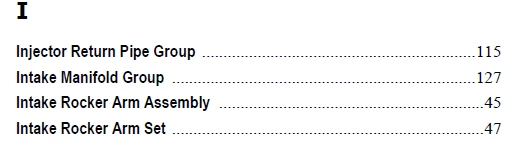
 

In case of the TOC, the page number text adopts the same font as one specified in the paragraph style, so why not the Index?

Any idea what one needs to tweak for ensuring identical font for text and page numbers in the FM Index? Thanks in advance for your help,


Regards


Apurva


This topic has been closed for replies.
Correct answer Barb Binder

Hi Apurva:  It's because in an Index, the links are on the page numbers and you might want to format them differently (i.e., blue and underline). You don't, so navigate back to the IX reference page and use Paragraph Designer to update the <$pagenum> building block. It's usually the last line on the page, then update your book. 


~Barb

3 replies

Barb Binder
Community Expert
Community Expert
February 26, 2021

Hey Bob, the space between the index entry and the page numbers, along with the spaces, commas and en dashes between the numbers, are controlled by the SeparatorsIX style. I normally just update it with the Paragraph Designer, but you can apply character styles as well. You have to format it or else the commas and en dashes won't match the font selected for the page numbers. 


~Barb

~Barb at Rocky Mountain Training
Bob_Niland
Community Expert
Community Expert
February 26, 2021

Barb Binder: … controlled by the SeparatorsIX style …

Thanks. I didn't take the time to triangulate it.

And, the story in this instance is more convoluted.

I actually deliberately set up each of the ¶formats on that RefPage, including ¶SeparatorsIX, imported from my template.fm file for the project. They are actually in-catalog for the file.

It appears that at some point, the RefPage "IX" that I had carefully curated, managed to lose its "Flow IX" assignment, so at some Update Book later, FM auto-created a new "IX1" page (with a Flow IX), but with all the visible contents as TNR 12pt, i.e., overrides.

It then generated the actual Index based in part on my ¶formats, and evidently in part on the overrides on RP IX1. Go figure.

Bob_Niland
Community Expert
Community Expert
February 25, 2021

In checking the PDF output from a current project, I was seeing an unexpected Times New Roman reported by Acrobat.

It turned out to be the space character between the Index item text and page numbers.
The Index item & the page numbers were in my desired font, as was the <$pagenum> building block on the RefPage, so the space formatting is apparently controlled by some other entry on that RP. I set 'em all to my intent, and the problem went away.

Each of those things has its own NameIX ¶Format associated with it, but that doesn't seem to control the generation in all instances. The text on the RP apparently has to have the desired formats applied in some cases, and by default the font seems to be TNR 12pt these days.

Barb Binder
Community Expert
Barb BinderCommunity ExpertCorrect answer
Community Expert
December 17, 2019

Hi Apurva:  It's because in an Index, the links are on the page numbers and you might want to format them differently (i.e., blue and underline). You don't, so navigate back to the IX reference page and use Paragraph Designer to update the <$pagenum> building block. It's usually the last line on the page, then update your book. 


~Barb

~Barb at Rocky Mountain Training
apuwdm2
apuwdm2Author
Inspiring
December 18, 2019

Hi Barb,


 Your solution is spot-on. I appreciate your quick reply. 


Regards,


Apurva