


Why does the number 1 or 2 display at the end of my TOC line?
I am using FrameMaker 10, Unstructured. I have created a book with a number of chapters added. Each chapter is also prefaced with its own TOC file (in brief, because of legacy issues), but I have also autogenerated a main TOC for the front of manual that was supposed to pull in the Heading 1 and Heading 2 chapter headings and page numbers for all chapters.
An issue that I have encountered in this main TOC and have not been able to figure out why and how the number 1 or 2 is displaying after the page number.For example, I've formatted the page number on the master to include chapter and page number (i.e., 1-3). But this number 1 or 2 has been pulled in from I don't know where, so I can't delete it. I've been working in the reference pages but I just cannot find where this number is coming from. I've checked page number variable in the master pages and it seems okay (<$curpagenum>, so it's: 1 - #, with 1 being the chapter number [I know I can use a variable for the chapter number instead of entering it manually, but I'm trying to quickly work through some legacy issues and resorted some manual fixes instead of changing file names, boo me]). Is it a variable or some auto-generated element, or is it because of all the TOCs, or what?
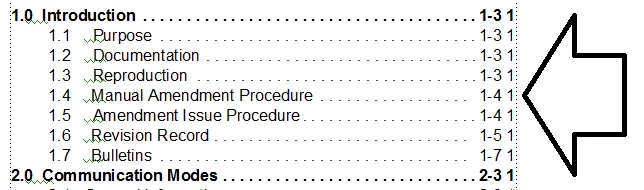
Hope someone has encountered this and can help. Thanks. C
 AdChoices